07. Software Development
In the sixth lab you processed text with filters and edited text files with vim and nano. In the programming course
you write programs in C, and the IDE builds and runs them when you press a button. In this lab you will build them
yourself, in the terminal, and see what happens behind that button. You will see how a compiled language differs
from an interpreted one, compile with gcc, and follow the four steps of the compilation pipeline: the
preprocessor, the compiler, the assembler and the linker. You will split a program into modules,
read the build errors of each step, and set up an editor that shows these errors while you type, through the
language server clangd. Then you will let make build the program for you, from a Makefile: rules,
automatic variables, pattern rules, phony targets and header dependencies. At the end, you will stop a running
program with the debugger gdb, and save the versions of your project with git.
The most important idea of this lab is that building a program is a chain of files: every file that you build (an
object file, the executable) is made from other files (the sources, the headers, other object files) by one
command. A Makefile writes this chain down as rules, and make compares the modification times of the files:
it runs a command only when its result is missing, or older than one of the files it is made from.
Objectives
- Understand the difference between a compiled, an interpreted and a bytecode language
- Compile and run a C program in the terminal with
gcc, without an IDE, and turn on the warnings with-Wall - Follow the four steps of the compilation pipeline, and stop after each of them with
gcc -E,-Sand-c - Look inside the files of each step with
file,nmandldd - Split a program into modules (a
.hand a.cfile), compile every.cfile to an object file, and link the object files into an executable - Read a build error, find out which step reported it, and fix it
- Understand what a language server is and how an editor talks to it, and use
clangdfrom an editor: errors, information, completion and go to definition - Write a
Makefilewith rules, and understand howmakedecides what to build from the modification times - Shorten a
Makefilewith automatic variables ($@,$<,$^), pattern rules and variables (CC,CFLAGS) - Add the phony targets
all,runandclean, and declare them with.PHONY - Write the header dependencies on the right rules
- Build a program with debug information (
-g), stop it withgdband look at its variables - Save the versions of a project with
git init,git add,git commit,git status,git diffandgit log
Resources
- Razvan Deaconescu, Razvan Rughinis, Mihai Carabas, Alexandru Radovici, Utilizarea Sistemelor de
Operare, Printech 2021
- Chapter 6 - Dezvoltarea aplicațiilor, sections 6.2 - 6.5, 6.6.7, 6.7.1 and 6.8
- Brian Ward, How LINUX Works, 3rd Edition, No Starch Press, 2021
- Chapter 15 - Development Tools, sections 15.1 and 15.2
- GNU Make Manual, chapter 2 - An Introduction to Makefiles, section 4.6 - Phony Targets and section 10.5 - Defining and Redefining Pattern Rules; Pro Git, chapters 1 - 3 and chapter 6 - GitHub; clangd, Getting started; the Language Server Protocol, Overview
- The lecture slides: 07. Software Development
- The manual pages:
man gcc,man make,man file,man nm,man objdump,man ldd,man ar,man strip,man ld.so,man gdb,man git,man git-commit,man git-diff,man git-log,man git-restore,man gitignore,man git-push,man git-pull,man git-clone,man ssh-keygen,man bearandclangd --help
Fedora and Ubuntu
The lab computers run Fedora with Sway, and the examples come from them. At home you may also use Ubuntu: the commands are the same, with a few differences:
| Fedora | Ubuntu | |
|---|---|---|
| install the tools of this lab | sudo dnf install gcc make gdb git clang-tools-extra | sudo apt install build-essential gdb git clangd |
| a function called without a declaration | an error (GCC 14 and newer) | Ubuntu 24.04 has GCC 13: only a warning |
the C library, in the output of ldd | /lib64/libc.so.6 | /lib/x86_64-linux-gnu/libc.so.6 |
the folder of cc1, a program that gcc runs | /usr/libexec/gcc/x86_64-redhat-linux/<VERSION>/ | /usr/lib/gcc/x86_64-linux-gnu/<VERSION>/ |
gcc -static (in Libraries) | needs sudo dnf install glibc-static | works |
gcc --version prints the version of gcc. The examples are for a PC (x86-64); on a computer with an ARM processor,
such as a Mac with Apple silicon, the assembly code and the addresses look different.
Compiling
Compiled and Interpreted Languages
The processor runs only machine code: instructions written as bytes, different for every family of processors (x86-64, ARM64, RISC-V). People write source code: text, in a programming language. Someone has to translate the source code into machine code, and the languages differ in who does it and when:
| Kind | Who translates the source code | When | Examples |
|---|---|---|---|
| compiled | a compiler, into machine code: the result is an executable | once, before the program runs | C, C++, Rust, Go |
| interpreted | an interpreter, a program that reads the source and does what it says | every time the program runs | shell scripts (bash, sh) |
| bytecode | a compiler, into bytecode (machine code for an imaginary processor); a virtual machine runs it | before the program runs (Java, C#), or when it starts (Python, JavaScript) | Java, C#, Python, JavaScript |
Think of a book in a foreign language: a compiled program is a printed translation, made once and read many times; an interpreted program is read with a translator next to you, who translates every sentence while you read.
[student@fedora lab07]$ ./hello.sh
Hello from bash!
[student@fedora lab07]$ file hello.sh /usr/bin/bash
hello.sh:      Bourne-Again shell script, ASCII text executable
/usr/bin/bash: ELF 64-bit LSB pie executable, x86-64, ...
hello.shis text: the interpreter,bash, reads it line by line.bashitself is machine code, an ELF file (Executable and Linkable Format, the format of the programs on Linux), written in C and compiled.
| Compiled | Interpreted | |
|---|---|---|
| speed | fast: the processor runs the machine code directly | slower: the interpreter translates the source at every run |
| errors | the compiler finds many of them before the program runs | an error shows up only when its line runs |
| after a change | compile again, then run | just run it again |
| portability | one executable for each processor and system | the same file runs wherever the interpreter is installed |
A language is not compiled or interpreted: the program that runs it is. python3 compiles a script to bytecode
every time it starts, then its virtual machine runs the bytecode; only the modules that a script imports are kept
compiled, in __pycache__. The virtual machines of Java and JavaScript also compile the code that runs often to
machine code, while it runs: just in time (JIT).
Compiling a C Program: gcc
gcc (the GNU Compiler Collection) is the C compiler of Linux, and often the one that runs behind the Build
button of your IDE. The examples use hello.c, which
exercise 1 creates in ~/lab07:
#include <stdio.h>

#define TIMES 3

int main(void)
{
    // say hello a few times
    for (int i = 0; i < TIMES; i++) {
        printf("Hello, %d!\n", i);
    }
    return 0;
}
[student@fedora lab07]$ gcc hello.c -o hello
[student@fedora lab07]$ ./hello
Hello, 0!
Hello, 1!
Hello, 2!
gcc hello.c -o hellocompiledhello.cinto the executablehello; it printed nothing, because nothing went wrong. The program starts with./: the current directory is not inPATH(see ThePATHSearch in lab 04).
| Option | What it does |
|---|---|
-o <FILE> | the name of the output file; without it, the executable is a.out |
-Wall | turns on the warnings about code that is legal, but probably wrong |
-g | adds the debug information, for gdb (see Debugging) |
-c, -S, -E | stop after a step of the pipeline (see The Compilation Pipeline) |
-l<NAME> | links the library <NAME>: -lm for the math functions, like sqrt |
-I <DIR> | also looks for the header files in <DIR> |
-static | creates a static executable (see The Linker) |
Behind the button of the IDE
The Build button of an IDE (Code::Blocks, Visual Studio Code, CLion) runs gcc with options like these, and
Run starts the executable; the build log of the IDE shows the exact commands. In the terminal, no button builds
the program before it runs: after you edit a .c file, you run gcc (or make) yourself.
You write the C files with a text editor from Text Editors in lab 06; after Build Errors, you will set up one that understands C.
The Compilation Pipeline
gcc hello.c -o hello looks like one step, but it is four. Each step reads the file of the step before, and
writes a new file. An option stops gcc after a step, so you can look at that file:

| Step | What it does | Stop after it | Writes |
|---|---|---|---|
| preprocessor | copies the #include files in, replaces the #defines, removes the comments | gcc -E hello.c -o hello.i | hello.i, preprocessed C |
| compiler | translates C into assembly, the text form of the machine code | gcc -S hello.c | hello.s, assembly |
| assembler | translates assembly into machine code | gcc -c hello.c | hello.o, object file |
| linker | joins the object files and the libraries into an executable | gcc hello.o -o hello | hello, executable |
Think of a car factory: the first station brings the parts together (the preprocessor), the next ones shape them (the compiler and the assembler), and the last one assembles the car (the linker).
The Preprocessor: gcc -E
The lines that start with # are for the preprocessor. It changes the text before the compiler sees it, a bit
like sed, and does not check that the result is correct C.
[student@fedora lab07]$ gcc -E hello.c -o hello.i
[student@fedora lab07]$ wc -l hello.c hello.i
   12 hello.c
  825 hello.i
  837 total
[student@fedora lab07]$ grep 'int printf' hello.i
extern int printf (const char *__restrict __format, ...);
[student@fedora lab07]$ tail -n 8 hello.i
int main(void)
{

    for (int i = 0; i < 3; i++) {
        printf("Hello, %d!\n", i);
    }
    return 0;
}
#include <stdio.h>copied the whole file/usr/include/stdio.h(and the files that it includes) intohello.i: hundreds of lines, among them the declaration ofprintf. The number of lines depends on the version of the C library.#define TIMES 3replacedTIMESwith3, and the comment is gone.
#include <stdio.h>, with angle brackets, looks only in the folders of the system, like /usr/include;
#include "lib.h", with quotes, looks first in the folder of the .c file.
The Compiler: gcc -S
The compiler translates C into assembly: one line for every instruction of the processor, still a text file.
[student@fedora lab07]$ gcc -S hello.c
[student@fedora lab07]$ grep -E 'call|cmpl|jle' hello.s
	call	printf@PLT
	cmpl	$2, -4(%rbp)
	jle	.L3
- The loop became a compare (
cmpl, isiat most2?) and a jump back (jle, jump if less or equal). printfis only called: its code is not inhello.s.
Two options make hello.s easier to read:
| Option | What it does |
|---|---|
-fverbose-asm | writes each line of C as a comment above its instructions, and the variable that each one uses |
-masm=intel | writes the Intel syntax instead of the AT&T syntax, the default of gcc (x86 only) |
[student@fedora lab07]$ gcc -S -fverbose-asm hello.c
[student@fedora lab07]$ grep -B1 cmpl hello.s
# hello.c:8:     for (int i = 0; i < TIMES; i++) {
	cmpl	$2, -4(%rbp)	#, i
[student@fedora lab07]$ gcc -S -masm=intel hello.c
[student@fedora lab07]$ grep -E 'call|cmp|jle' hello.s
	call	printf@PLT
	cmp	DWORD PTR -4[rbp], 2
	jle	.L3
-fverbose-asmshowed that the compare comes from line 8 ofhello.c, thefor, and that-4(%rbp)isi.-masm=intelwrote the same instructions in the Intel syntax, the one of the manuals of Intel and AMD and of most books: the operands are in the reverse order, without%and$, and the size is a word (DWORD PTR, 4 bytes) instead of a letter (thelofcmpl).
The Assembler: gcc -c
The assembler translates the assembly into machine code. The result is an object file: machine code that
cannot run yet, because it has holes. To call printf, the code needs its address, but printf is not defined in
hello.c, so the assembler does not know where it is: it leaves an empty place, and a note with the name printf.
The linker fills these holes later.
[student@fedora lab07]$ gcc -c hello.c
[student@fedora lab07]$ file hello.o
hello.o: ELF 64-bit LSB relocatable, x86-64, version 1 (SYSV), not stripped
[student@fedora lab07]$ nm hello.o
0000000000000000 T main
                 U printf
nmlisted the names (the symbols) ofhello.o:Tmeans defined here (in the text, the code),Umeans used here but undefined.objdump -d hello.oshows the machine code, as bytes, next to the assembly;-M inteluses the Intel syntax. To see each line of C above its machine code, compile with-gand add-S:gcc -g -c hello.c, thenobjdump -d -S -M intel hello.o.
The Linker
The linker (ld, which gcc runs for you) joins the object files into an executable, and fills in their holes.
For every name that an object file uses but does not define (a U in nm), the linker looks for the one place
that defines it (a T), in another object file or in a library. If it finds none, it stops with
undefined reference; if it finds two, with multiple definition (see Build Errors).
printf is defined in the C library, the file libc.so.6, which the linker searches for every program, without
being asked. It is a shared library, so the linker does not copy printf into hello: it only writes down that
hello needs libc.so.6.
[student@fedora lab07]$ gcc hello.o -o hello
[student@fedora lab07]$ file hello
hello: ELF 64-bit LSB pie executable, x86-64, ..., dynamically linked, ...
[student@fedora lab07]$ ldd hello
	linux-vdso.so.1 (0x00007ffc8d5f2000)
	libc.so.6 => /lib64/libc.so.6 (0x00007f2b6a200000)
	/lib64/ld-linux-x86-64.so.2 (0x00007f2b6a4b1000)
gccsaw an object file, not a.cfile, so it ran only the linker.lddlisted the libraries thathelloneeds when it starts:printfis not copied intohello, it stays inlibc.so.6, which the system loads every timehellostarts. The numbers in parentheses change at every run.
With gcc -static, the linker copies printf, and everything that it needs, from the C library into the
executable: the program does not need libc.so.6 any more, but it is much larger. On Fedora, -static needs the
package glibc-static. The exercises at home and the challenges build their own libraries: the details are in
Libraries.
gcc -save-temps hello.c -o hello runs the four steps and keeps the files of each step: hello.i, hello.s and
hello.o.
Several Source Files
A real program has many source files. Each part of the program, a module, is a pair of files:
| File | What it has | Who uses it | Example: lib |
|---|---|---|---|
.h, the header | the declarations: what the module offers, without the code; also its #defines and types | every .c file that calls the module, with #include | lib.h: int sum(int n); |
.c, the source | the definitions: the code of the functions | the compiler, which turns it into an object file | lib.c: int sum(int n) { ... } |
Every .c file that uses a module includes its header, so the compiler knows the name and the types of the functions
it calls. The examples use the files of ~/lab07/project, a program that adds the numbers from 1 to MAX:
project/
├── main.c      # includes lib.h and print.h; main() calls sum() and print_result()
├── lib.h       # #define MAX 10, declares sum()
├── lib.c       # includes lib.h, defines sum()
├── print.h     # declares print_result()
└── print.c     # includes <stdio.h> and print.h, defines print_result() with printf()
#ifndef LIB_H
#define LIB_H
#define MAX 10
int sum(int n);
#endif
#ifndef,#defineand#endifare the include guard: if a.cfile includeslib.htwice, the second copy is skipped.
Every .c file is compiled alone, to its own object file, and the linker joins the object files:

[student@fedora project]$ gcc -c main.c
[student@fedora project]$ gcc -c lib.c
[student@fedora project]$ gcc -c print.c
[student@fedora project]$ gcc main.o lib.o print.o -o app
[student@fedora project]$ ./app
sum = 55
- In
main.o,sumandprint_resultareU; the linker found them inlib.oandprint.o.
This is why every .c file is compiled to its own object file. After a change to print.c, only print.o is out of
date, so two commands are enough: gcc -c print.c compiles it again, and gcc main.o lib.o print.o -o app links the
program.
gcc main.c lib.c print.c -o app gives the same program in one command, but it compiles all the files every
time. With three files, this does not matter. The Linux kernel has more than 30 000 .c files: compiling only the ones
that changed saves minutes at every build.
Build Errors
These are the messages that the build log of the IDE shows. Who reports the error tells you what is wrong:
| The message | Reported by | The cause | The fix |
|---|---|---|---|
fatal error: lib.h: No such file or directory | preprocessor | a wrong name in #include, or the header is in another folder | fix the name, or add -I <DIR> |
error: implicit declaration of function ‘sum’ | compiler | sum is called, but nothing above the call declares it | include the header that declares it |
error: expected ‘;’ before ‘}’ token | compiler | a syntax error, on the line it names or on the line before | add the missing ; |
undefined reference to `sum' | linker | no object file defines sum | add the .o file that defines it |
undefined reference to `sqrt' | linker | the function is in a library that is not linked | add -lm at the end of the command |
multiple definition of `sum' | linker | two object files define sum | keep only one of them |
[student@fedora lab07]$ gcc roots.c -o roots
/usr/bin/ld: /tmp/ccx5idIu.o: in function `main':
roots.c:(.text+0x1c): undefined reference to `sqrt'
collect2: error: ld returned 1 exit status
[student@fedora lab07]$ gcc roots.c -o roots -lm
[student@fedora lab07]$ ./roots
sqrt(1) = 1.000
sqrt(2) = 1.414
sqrt(3) = 1.732
sqrt(4) = 2.000
/usr/bin/ldandcollect2mean that the linker failed: compiling worked, but nobody definessqrt. It is in the math library,libm, which-lmadds.- The errors of the preprocessor and of the compiler start with
<FILE>:<LINE>:<COLUMN>:, the place of the problem.
A warning does not stop the build, but it often shows a bug. Always compile with -Wall, and fix every warning.
An Editor with a Language Server
In the IDE of the programming course, the code is colored, names are completed and errors are marked while you type.
In the terminal, two programs do this together: an editor, and a language server, a program that understands
one language. For C, the language server is clangd.
The LSP (Language Server Protocol) is the common language between them: any editor that speaks LSP can use any language server. Without it, every editor needs its own plugin for every language.

Think of a colleague who reads over your shoulder while you write: the editor is your notebook, and the language server is the colleague, who reads every line and answers your questions about it.
How a Language Server Works
When you open a C file, the editor starts clangd as a child process (lab 03) and talks to it through two
pipes (lab 06), in short JSON messages. The editor sends the text after every change and asks questions; clangd
answers them, and sends the errors by itself.

clangd checks the code while you type, like the compiler, but it does not build anything.
Choosing an Editor
Install clangd (Fedora: sudo dnf install clang-tools-extra; Ubuntu: sudo apt install clangd) and one of
these editors:
| Editor | Where it runs | What it needs to use clangd |
|---|---|---|
vim | terminal | a plugin, vim-lsp, and about 20 lines in ~/.vimrc |
nvim 0.11 or newer | terminal | a few lines in ~/.config/nvim/init.lua |
hx (Helix) | terminal | nothing |
emacs 29 or newer | both | one line in ~/.emacs.d/init.el |
code (VS Code) | window | the extension clangd |
zed (Zed) | window | nothing |
nvim, not vim
If you like the keys of vim (see Text Editors in lab 06), use nvim: it has the same
keys and a language client built in, so its setup is a few lines. vim needs a plugin and about 20 lines of
Vimscript. The other editors need almost no setup.
Install, configure and check your editor:
- vim
- nvim
- hx
- emacs
- VS Code
- Zed
This is the hardest setup
vim has no language client of its own, and every new feature needs more Vimscript: use nvim instead, with the
same editing keys (see the tip above).
Install vim (Fedora: sudo dnf install vim-enhanced; Ubuntu: sudo apt install vim) and the plugin vim-lsp, in
the folder where vim loads its plugins by itself:
git clone https://github.com/prabirshrestha/vim-lsp ~/.vim/pack/lsp/start/vim-lsp
Then add these lines to ~/.vimrc: they start clangd for the C files, and give the keys of the table below.
let g:lsp_diagnostics_virtual_text_enabled = 1
if executable('clangd')
  au User lsp_setup call lsp#register_server({
        \ 'name': 'clangd',
        \ 'cmd': {server_info->['clangd']},
        \ 'allowlist': ['c', 'cpp'],
        \ })
endif
function! s:on_lsp_buffer_enabled() abort
  setlocal omnifunc=lsp#complete
  nmap <buffer> gd <plug>(lsp-definition)
  nmap <buffer> gr <plug>(lsp-references)
  nmap <buffer> K <plug>(lsp-hover)
  nmap <buffer> <leader>rn <plug>(lsp-rename)
  nmap <buffer> <leader>ca <plug>(lsp-code-action)
  nmap <buffer> ]d <plug>(lsp-next-diagnostic)
endfunction
augroup lsp_install
  au!
  autocmd User lsp_buffer_enabled call s:on_lsp_buffer_enabled()
augroup END
Check: open a .c file, and run :LspStatus; it shows clangd: running.
In the table, \ is the leader key of vim, <leader> in ~/.vimrc.
| What you want | Keys |
|---|---|
| see the errors | at the end of the line; ] d goes to the next one |
| see what the name under the cursor is | K |
| complete a name | in Insert mode, Ctrl+X Ctrl+O |
| go to the definition, come back | g d, Ctrl+O |
| list the uses of a name | g r |
| rename a name, in every file | \ r n |
| apply the fix that it suggests | \ c a |
Install Neovim (Fedora: sudo dnf install neovim). It needs version 0.11 or newer (nvim --version); Ubuntu 24.04
has an older one: use Helix or Zed there. Then add these lines to ~/.config/nvim/init.lua:
vim.lsp.config('clangd', {
  cmd = { 'clangd' },
  filetypes = { 'c', 'cpp' },
  root_markers = { 'compile_commands.json', 'compile_flags.txt', 'Makefile', '.git' },
})
vim.lsp.enable('clangd')
vim.diagnostic.config({ virtual_text = true })
Check: open a .c file, and run :checkhealth vim.lsp; it lists clangd among the active clients.
Ready-made setups: instead of writing init.lua yourself, you can start from a configuration that already has
clangd, completion and a file explorer. They need a recent Neovim and git. Move your ~/.config/nvim and
~/.local/share/nvim aside first, where the setups install their plugins:
- kickstart.nvim: one file, explained by its comments; the best start if you want to understand your configuration;
- LazyVim, NvChad and AstroNvim: complete setups, ready to use.
Documentation: :help lsp in Neovim (online), and
nvim-lspconfig, the settings of many language servers, ready to use.
| What you want | Keys |
|---|---|
| see the errors | at the end of the line; ] d goes to the next one |
| see what the name under the cursor is | K |
| complete a name | in Insert mode, Ctrl+X Ctrl+O |
| go to the definition, come back | Ctrl+], Ctrl+T |
| list the uses of a name | g r r |
| rename a name, in every file | g r n |
| apply the fix that it suggests | g r a |
Install Helix (Fedora: sudo dnf install helix; Ubuntu: sudo snap install --classic helix); its command is hx. It
needs no settings: it starts clangd by itself for every .c file.
[student@fedora project]$ hx --health c
...
Configured language servers:
  ✓ clangd: /usr/bin/clangd
...
- Helix found
clangdinPATH. A✘there means thatclangdis not installed.
| What you want | Keys |
|---|---|
| see the errors | marked at the left; Space d lists them |
| see what the name under the cursor is | Space k |
| complete a name | appears while you type |
| go to the definition, come back | g d, Ctrl+O |
| list the uses of a name | g r |
| rename a name, in every file | Space r |
| apply the fix that it suggests | Space a |
Install Emacs (Fedora: sudo dnf install emacs; Ubuntu: sudo apt install emacs). From version 29 it has a
language client built in, Eglot, which already knows clangd. This line in ~/.emacs.d/init.el starts it for
every C file; if you already have a file ~/.emacs, put the line there instead, because Emacs reads only one of them:
(add-hook 'c-mode-hook 'eglot-ensure)
Check: open a .c file (emacs -nw main.c stays in the terminal); the mode line, at the bottom, shows eglot.
| What you want | Keys |
|---|---|
| see the errors | underlined; Alt+X flymake-show-buffer-diagnostics lists them |
| see what the name under the cursor is | shown at the bottom, by itself |
| complete a name | Ctrl+Alt+I |
| go to the definition, come back | Alt+., Alt+, |
| list the uses of a name | Alt+? |
| rename a name, in every file | Alt+X eglot-rename |
| apply the fix that it suggests | Alt+X eglot-code-actions |
Download the .rpm (Fedora) or the .deb (Ubuntu) package from code.visualstudio.com,
install it with sudo dnf install ./code-*.rpm (Ubuntu: sudo apt install ./code_*.deb), and add the extension
clangd, from the LLVM project, from the Extensions bar:
- press Ctrl+Shift+X, or click the icon with four squares, on the bar at the left;
- type
clangdin the search box at the top; - choose clangd, published by LLVM, and press Install.
The same, from the terminal:
code --install-extension llvm-vs-code-extensions.vscode-clangd
If the extension C/C++ of Microsoft is also installed, the extension clangd asks to turn off its IntelliSense:
accept, so that only clangd checks the code. If clangd is not installed, the extension offers to download it:
install the package instead, so that every editor uses the same clangd. VSCodium, the same editor without the
Microsoft parts, works the same way; its command is codium, not code.
Check: open the folder of the project (code ~/lab07/project), then a .c file; the status bar, at the bottom,
shows clangd.
| What you want | Keys |
|---|---|
| see the errors | red underline; Ctrl+Shift+M lists them |
| see what the name under the cursor i | keep the mouse over it, or Ctrl+K Ctrl+I |
| complete a name | appears while you type; Ctrl+Space |
| go to the definition, come back | F12, Ctrl+Alt+- |
| list the uses of a name | Shift+F12 |
| rename a name, in every file | F2 |
| apply the fix that it suggests | Ctrl+. |
Install Zed with its script, the same on Fedora and on Ubuntu:
curl -f https://zed.dev/install.sh | sh
The script installs the command zed in ~/.local/bin; if the shell does not find it, log out and log in again.
The script installs the command zed in ~/.local/bin; if the shell does not find it, log out and log in again.
Zed works out of the box: it needs no settings and no extension, and starts clangd by itself for every .c
file. Check: open the folder of the project (zed ~/lab07/project), then a .c file, and make an error: it is
underlined at once.
| What you want | Keys |
|---|---|
| see the errors | red underline; Ctrl+Shift+M lists them |
| see what the name under the cursor is | keep the mouse over it |
| complete a name | appears while you type |
| go to the definition, come back | F12, Ctrl+Alt+- |
| list the uses of a name | right click, Find All References |
| rename a name, in every file | F2 |
| apply the fix that it suggests | Ctrl+. |
When the project has headers in other folders, clangd needs the options of gcc: they are in
What clangd Needs to Know, after the Makefile.
The Makefile
After every change you must remember which commands to run again, and in which order. make does it for you. It reads
a file named Makefile, from the current directory, that says, for every file to build, what it is made from and
which commands make it. Then make runs only the commands that are needed.
Think of a recipe book in which each recipe lists its ingredients: to make a cake, you first make the cream it needs, but only if you do not already have fresh cream in the fridge.
A Rule
A Makefile is a list of rules:
target: prerequisites
	command 1
	command 2
| Part | What it is |
|---|---|
| target | the file to build |
| prerequisites | the files it is made from, separated by spaces |
| recipe | the commands that build it, one per line, each line starting with a TAB |
The Makefile of hello has two rules:
hello: hello.o
	gcc hello.o -o hello

hello.o: hello.c
	gcc -c hello.c
hellois linked fromhello.o;hello.ois compiled fromhello.c.makealone builds the first target,hello;make hello.obuilds onlyhello.o.
A TAB, not spaces
Every line of a recipe starts with a TAB character. With spaces, make stops with
Makefile:2: *** missing separator. Stop. Most editors keep the TABs in a file named Makefile; in vim,
:set list shows a TAB as ^I.
How make Decides
To build a target, make:
- builds its prerequisites first, each with its own rule, in the same way;
- runs the recipe if the target does not exist, or if a prerequisite is newer than the target;
- otherwise, does nothing: the target is up to date.
A prerequisite without a rule, like hello.c, must exist. make compares only the modification times of the
files (ls -l --full-time shows them, to the fraction of a second); it never reads the code.
[student@fedora lab07]$ make
gcc -c hello.c
gcc hello.o -o hello
[student@fedora lab07]$ make
make: 'hello' is up to date.
[student@fedora lab07]$ touch hello.c
[student@fedora lab07]$ make
gcc -c hello.c
gcc hello.o -o hello
- The first
makebuilt both files: they did not exist.makeprints every command before it runs it. - The second
makedid nothing:hello.cis older thanhello.o, andhello.ois older thanhello. touch(seetouchin lab 02) set the time ofhello.cto now, as if you had edited it:hello.cbecame newer thanhello.o, somakecompiled it again, and thenhello.owas newer thanhello.
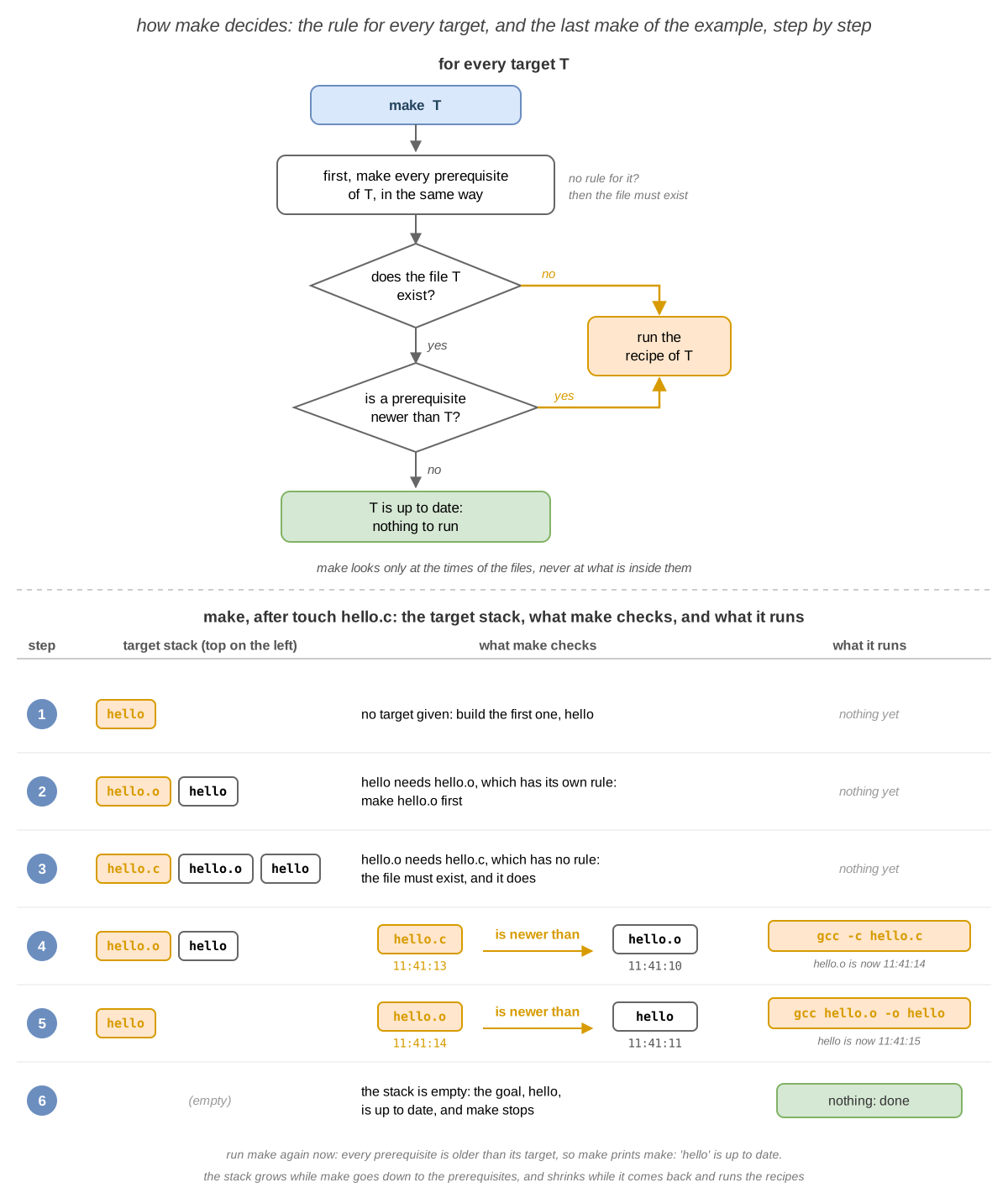
The picture shows the rule that make follows for every target, then the last make, step by step: make keeps a
stack of the targets it is working on. It goes down to the prerequisites, then comes back up and runs the
recipes that are needed.
| Command | What it does |
|---|---|
make | builds the first target of the Makefile, and only what is out of date |
make <TARGET> | builds <TARGET> |
make -n | shows the commands that it would run, without running them (dry run) |
make -B | builds every target again, even the ones that are up to date |
make <VAR>=<VALUE> | changes a variable for this run only; the Makefile stays the same (see Variables) |
make -C <DIR> | goes to <DIR> first, and works there, as if you ran make in <DIR> |
make --debug=v | explains why it builds, or skips, every target |
make -j<N> | runs up to <N> commands at the same time |
A Makefile for a Project
For the project, every object file has a rule, and app is linked from the three object files:
app: main.o lib.o print.o
	gcc main.o lib.o print.o -o app

main.o: main.c
	gcc -c main.c

lib.o: lib.c
	gcc -c lib.c

print.o: print.c
	gcc -c print.c
[student@fedora project]$ make
gcc -c main.c
gcc -c lib.c
gcc -c print.c
gcc main.o lib.o print.o -o app
[student@fedora project]$ touch print.c
[student@fedora project]$ make
gcc -c print.c
gcc main.o lib.o print.o -o app
- After
touch print.c,main.oandlib.owere still up to date:makecompiled onlyprint.c, then linked.
The three rules of the object files are almost the same. The next three sections make the Makefile shorter.
Automatic Variables
Inside a recipe, make replaces the automatic variables with the names of the rule:
| Variable | What it means | In the rule app: main.o lib.o print.o |
|---|---|---|
$@ | the target | app |
$< | the first prerequisite | main.o |
$^ | all the prerequisites | main.o lib.o print.o |
With them, the recipe of app is gcc $^ -o $@, and the recipes of the three object files become the same:
gcc -c $< -o $@.
Pattern Rules
A pattern rule is one rule for many files: % matches any name, the same one in the target and in the
prerequisite. %.o: %.c means main.o: main.c, lib.o: lib.c, print.o: print.c, and any other object file.
app: main.o lib.o print.o
	gcc $^ -o $@

%.o: %.c
	gcc -c $< -o $@
- 11 lines became 5. A new module needs only its object file in the list of
app.
make also has built-in rules: without any rule for main.o, it still compiles main.c, with cc -c. Write
your own rules, so that you choose the commands.
Variables
A variable keeps a value in one place: write it as NAME = value, and use it as $(NAME). Two names are a
convention, and every C programmer expects them:
| Variable | What it holds | Usual value |
|---|---|---|
CC | the C compiler | gcc |
CFLAGS | the options of the compiler | -Wall -g |
CC = gcc
CFLAGS = -Wall -g

app: main.o lib.o print.o
	$(CC) $^ -o $@

%.o: %.c
	$(CC) $(CFLAGS) -c $< -o $@
[student@fedora project]$ make -B
gcc -Wall -g -c main.c -o main.o
gcc -Wall -g -c lib.c -o lib.o
gcc -Wall -g -c print.c -o print.o
gcc main.o lib.o print.o -o app
[student@fedora project]$ make -n -B CFLAGS=-O2
gcc -O2 -c main.c -o main.o
...
makeprinted every command after replacing the variables.CFLAGS=-O2on the command line replaced the value of theMakefile, without changing the file;-nonly showed the commands.
Phony Targets
Some targets are not files: they are names for something that you ask make to do. clean deletes what make built:
clean:
	rm -f *.o app
make clean runs rm every time, because there is never a file named clean. But if one appears, clean has no
prerequisites and the file exists, so it is up to date, and rm does not run:
[student@fedora project]$ touch clean
[student@fedora project]$ make clean
make: 'clean' is up to date.
The special target .PHONY lists the targets that are not files: make does not look for a file with their name,
and always runs their recipes. The usual phony targets are:
| Target | What it does |
|---|---|
all | builds everything; it is the first target, so make means make all |
run | builds the program, if it is out of date, then runs it |
clean | deletes the files that make built |
install | copies the program into a folder of PATH, so that you can run it by its name from any folder |
uninstall | deletes what install copied |
CC = gcc
CFLAGS = -Wall -g

.PHONY: all run clean

all: app

run: app
	./app

app: main.o lib.o print.o
	$(CC) $^ -o $@

%.o: %.c
	$(CC) $(CFLAGS) -c $< -o $@

clean:
	rm -f *.o app
[student@fedora project]$ make run
./app
sum = 55
[student@fedora project]$ make
make: Nothing to be done for 'all'.
make runcheckedappfirst: it was up to date, somakeonly ran./app.allhas no recipe, andappwas up to date: nothing to do.
These names are a convention, not part of make: every C programmer expects them, but make treats them like any
other target. Only the order matters: make alone builds the first target of the Makefile.
These names are a convention, not part of make: every C programmer expects them, but make treats them like any
other target. Only the order matters: make alone builds the first target of the Makefile.
Header Dependencies
A header is also a prerequisite: an object file must be compiled again when a header that its .c file includes
changes. With the Makefile above, make does not know that:
[student@fedora project]$ sed -i 's/MAX 10/MAX 100/' lib.h
[student@fedora project]$ make
make: Nothing to be done for 'all'.
[student@fedora project]$ ./app
sum = 55
- The sum of the numbers from 1 to 100 is
5050, butmain.owas not compiled again:lib.his not in any rule.
The dependencies follow the #include lines. Look at the #include lines of every .c file, and add each header
to the rule of its object file:

main.o: lib.h print.h
lib.o: lib.h
print.o: print.h
- These rules have no recipe: they only add prerequisites, and the recipe still comes from
%.o: %.c. Put them at the end of theMakefile, so thatallstays the first target.
[student@fedora project]$ make
gcc -Wall -g -c main.c -o main.o
gcc -Wall -g -c lib.c -o lib.o
gcc main.o lib.o print.o -o app
[student@fedora project]$ ./app
sum = 5050
main.candlib.cincludelib.h: their object files were compiled again;print.owas kept.
A header goes on the rule of an object file, never on the rule of the executable: with
app: main.o lib.o print.o lib.h, make only links again the old main.o, which still has MAX equal to 10.
What clangd Needs to Know
clangd checks each file as gcc would compile it, so it needs the same options, like -I <DIR>. Without them, a
header from another folder gives '<HEADER>' file not found in the editor, even if make works. Give it the options
in a file in the folder of the project:
| File | What it has | How you make it | Use it when |
|---|---|---|---|
compile_flags.txt | the options of gcc, one per line, the same for every file | by hand, in the editor: for example, the line -Iinclude | all the files use the same options |
compile_commands.json | the exact gcc command of every file, as make ran it | make clean, then bear -- make; again after you add a file | the files use different options, or a rename must change every file |
bear (Fedora: sudo dnf install bear; Ubuntu: sudo apt install bear) writes down every command that make runs,
so start from a clean build. With compile_commands.json, clangd also knows the files that you did not open: a
rename changes all of them. It keeps what it learns, the index of the project, in the folder .cache, which
does not go in the repository (see Saving Versions).
clangd --check=<FILE> checks a file in the terminal; its last line ends with All checks completed, 0 errors when
the file has no error.
Debugging: gdb
A debugger runs another program under its control: it stops it at a line, runs it one line at a time, and shows
its variables, while it runs. It is faster than adding printf lines and compiling again. gdb is the debugger of
GNU. It needs the program built with -g, which adds the debug information: which machine code comes from which
line, and where every variable is. The Makefile of the project already has -g in CFLAGS.
| Command | Short | What it does |
|---|---|---|
gdb ./app | starts gdb with the program; the program does not run yet | |
break <FUNCTION>, break <FILE>:<LINE> | b | sets a breakpoint: the program will stop there, before that line runs |
break <PLACE> if <CONDITION> | stops there only when the C condition is true: break sum if n > 5 | |
watch <VARIABLE> | stops every time the variable changes, and prints its old and its new value | |
delete <N> | d | deletes breakpoint number <N>; without <N>, deletes them all |
run | r | starts the program; it runs until a breakpoint, or until it ends |
next | n | runs the line that gdb showed; a function that it calls runs whole, without stopping |
step | s | runs the line that gdb showed, but stops inside the function that it calls |
finish | fin | runs until the current function returns, and prints the value it returns |
continue | c | runs until the next breakpoint, or until the program ends |
print <EXPRESSION> | p | prints a variable, or any C expression: print n * 2 |
backtrace | bt | prints the call stack: the current function, the one that called it, and so on |
up, down | moves to the function that called this one, or back, to print its variables | |
quit | q | quits gdb, and stops the program if it still runs |
[student@fedora project]$ gdb -q ./app
Reading symbols from ./app...
(gdb) break sum
Breakpoint 1 at 0x1171: file lib.c, line 5.
(gdb) run
Starting program: /home/student/lab07/project/app
...
Breakpoint 1, sum (n=10) at lib.c:5
5	    int s = 0;
(gdb) print n
$1 = 10
(gdb) backtrace
#0  sum (n=10) at lib.c:5
#1  0x0000555555555150 in main () at main.c:6
(gdb) continue
Continuing.
sum = 55
[Inferior 1 (process 4211) exited normally]
(gdb) quit
-q(quiet) skipped the text about the license.break sumset a breakpoint on the first line of the body ofsum, line 5 oflib.c; the addresses and the number of the process change from one computer to another.- The program stopped before line 5 ran;
backtraceshowed thatmain, at line 6 ofmain.c, calledsum. continuelet the program run to its end.
On Fedora and Ubuntu, gdb may ask Enable debuginfod for this session? (y or [n]): answer n. It offers
to download the debug information of the system libraries, which this lab does not need; skip the lines about
Missing ... debuginfo in the same way. gdb -tui shows the source code above the commands.
Saving Versions: git
Git is a version control system: it keeps the history of the files of a project. You can go back to any
version, see what changed and why, and work on the same code together with other people. The folder with the files
and their history (in the hidden folder .git) is a repository. A commit is a snapshot of all the files, with
an author, a date and a message; its name is a hash, like ed6ba3b.
Think of the save points of a game: you save when things work, and you can always come back to a save point.
A change goes through three places on your computer: you edit the files, git add puts them in the staging
area (what the next commit will have), and git commit saves the commit in the repository.
| Command | What it does |
|---|---|
git config --global user.name "<NAME>" | your name, written in every commit; once per computer |
git config --global user.email "<EMAIL>" | your email, written in every commit; once per computer |
git init | turns the current folder into a repository |
git status | shows the changed files, and what is in the staging area |
git add <FILE> | adds the changes of <FILE> to the staging area; git add . adds all |
git commit -m "<MESSAGE>" | saves the staging area as a commit |
git diff | shows the changes that are not in the staging area yet |
git log --oneline | shows the commits, one per line, the newest first |
git restore <FILE> | throws away the changes of <FILE> that are not in the staging area; you cannot get them back |
git switch -c <BRANCH>, git switch <BRANCH> | creates a branch and goes to it; goes to a branch |
git merge <BRANCH> | brings the commits of <BRANCH> into the current branch |
The files that make builds can always be built again: they do not go in the repository, and neither does the
folder .cache, where clangd keeps its index. The file .gitignore lists, one per line, the names (or the globs)
that git ignores:
[student@fedora project]$ git init
Initialized empty Git repository in /home/student/lab07/project/.git/
[student@fedora project]$ printf '*.o\napp\n.cache/\n' > .gitignore
[student@fedora project]$ git add .
[student@fedora project]$ git status --short
A  .gitignore
A  Makefile
A  lib.c
A  lib.h
A  main.c
A  print.c
A  print.h
[student@fedora project]$ git commit -m "Add the sum program"
[main (root-commit) ed6ba3b] Add the sum program
 7 files changed, 60 insertions(+)
...
git status --shortshowedA(added) for the files in the staging area; the object files andappare not there, because of.gitignore.- The hash of your commit is different: it depends on the content, the author and the time.
Working with GitHub
The First Steps use only your computer; the exercises at home and the challenges also use GitHub.
A commit stays on your computer. A remote is a copy of the repository on a server, such as GitHub, GitLab or
Codeberg: you push your commits to it, and pull from it the commits of your colleagues. A colleague starts by
cloning the repository: a copy of the files and of the whole history, connected to the same remote, origin.
Think of a shared folder in the cloud that keeps every save point, with its author.
| Command | What it does |
|---|---|
git remote add origin <URL> | connects the repository to the remote <URL>, under the name origin |
git remote -v | lists the remotes |
git push -u origin main | sends main to origin the first time; -u remembers it, then git push is enough |
git push origin <BRANCH> | sends another branch |
git pull | brings the new commits of origin, and merges them into the current branch |
git clone <URL> <DIR> | copies the repository into <DIR>, with origin already set |
git branch -d <BRANCH> | deletes a local branch that is merged |
git push origin --delete <BRANCH> | deletes a branch on the remote |
git config --global pull.rebase false | git pull merges when both sides have new commits; once per computer |
GitHub does not accept your password in the terminal. Use an SSH key: a pair of files, a private key that
never leaves your computer, and a public key that you give to GitHub. With a key, the URL of a repository is
git@github.com:<USER>/<REPO>.git. Create the key once per computer:
ssh-keygen -t ed25519 -C "<EMAIL>"    # press Enter at every question
cat ~/.ssh/id_ed25519.pub             # paste it in GitHub: Settings, SSH and GPG keys, New SSH key
ssh -T git@github.com                 # answer yes the first time
- When GitHub knows your key,
ssh -T git@github.comprintsHi <USER>! You've successfully authenticated, but GitHub does not provide shell access.
A pull request (PR) is a request, made on GitHub, to merge a branch into main. Your colleagues read the changes
in the tab Files changed, comment on them, and press Merge pull request; then everybody runs git pull. The rule
of most teams: do not commit on main directly; create a branch, push it, and open a pull request.
When two people change the same lines, git pull cannot choose between them, and stops with a conflict:
[student@fedora bob]$ git pull
...
CONFLICT (content): Merge conflict in motto.txt
Automatic merge failed; fix conflicts and then commit the result.
[student@fedora bob]$ cat motto.txt
<<<<<<< HEAD
keep it clear
=======
keep it short
>>>>>>> 6c37dc458b34401722a29eace880dec81e97dffb
- Between
<<<<<<<and=======is your version, between=======and>>>>>>>the version that came fromorigin. Edit the file until it has the right text and no marker line, thengit addit and rungit commit: the result is a merge commit, with two parents.
Libraries
Going deeper
You do not need this section for the exercises of the lab, the 🧪 First Steps. Read it at home: the 🏠 Going Further exercises and the 📝 Challenges use it.
A library is a file with compiled functions, ready to be used by other programs: printf is in the C library,
sqrt in the math library. There are two kinds:

| Static library | Shared library | |
|---|---|---|
| the file | lib<NAME>.a, an archive of object files | lib<NAME>.so, a shared object, ready to be loaded |
| the linker | copies the functions into the executable | only writes down that the executable needs the library |
| when the program starts | nothing more to load: the code is already in the executable | the loader (ld-linux-x86-64.so.2) finds the library, and loads it |
| a new version of the library | link every program again | every program uses it at its next start |
| the size | large executables: every program has its own copy | small executables: one copy, on the disk and in memory, for all programs |
| if the library is missing | the program still runs | the program does not start: error while loading shared libraries |
By default, gcc links the C library as a shared library. -static copies it in:
[student@fedora lab07]$ gcc hello.c -o hello-dynamic
[student@fedora lab07]$ gcc -static hello.c -o hello-static
[student@fedora lab07]$ stat -c '%s %n' hello-dynamic hello-static
8880 hello-dynamic
650832 hello-static
[student@fedora lab07]$ ldd hello-static
	not a dynamic executable
- The two programs come from the same source, with the same command; only
-staticdiffers.hello-staticis about 70 times larger: it carries its own copy ofprintf, and of everything thatprintfneeds. The sizes change from one system to another, and from one processor to another. hello-staticis still smaller than the C library (stat -L -c '%s' /lib64/libc.so.6prints more than 1 MiB): the linker copied only the parts of the library that the program uses.
You can build your own libraries. -l<NAME> links lib<NAME>.so or, if there is none, lib<NAME>.a; it looks for
them in the folders given with -L <DIR>, then in the folders of the system (/usr/lib64 on Fedora):
| Command | What it does |
|---|---|
ar rcs libsum.a lib.o | creates the static library libsum.a from lib.o |
ar t libsum.a | lists the object files of the archive |
gcc -fPIC -c lib.c | compiles code that works at any address (Position Independent Code), as a shared library needs |
gcc -shared lib.o -o libsum.so | creates the shared library libsum.so |
gcc main.o print.o -L. -lsum -o app | links app with libsum from the current folder (.) |
LD_LIBRARY_PATH=. ./app | runs app, and lets the loader also look for libraries in . |
[student@fedora project]$ gcc -fPIC -c lib.c
[student@fedora project]$ gcc -shared lib.o -o libsum.so
[student@fedora project]$ gcc main.o print.o -L. -lsum -o app
[student@fedora project]$ ./app
./app: error while loading shared libraries: libsum.so: cannot open shared object file: No such file or directory
[student@fedora project]$ LD_LIBRARY_PATH=. ./app
sum = 55
-L.told the linker wherelibsum.sois, but not the loader: whenappstarts, the loader looks only in the folders of the system.LD_LIBRARY_PATH(seeman ld.so) adds folders for one command; installing the library in/usr/lib64is the other way.
Troubleshooting
| Problem | Solution |
|---|---|
bash: gcc: command not found (or make, gdb) | The tool is not installed: see Fedora and Ubuntu |
bash: hello: command not found, but the file is there | The current directory is not in PATH: run ./hello |
| The program does not change after you edit the source | Unlike the IDE, the terminal does not build the program before it runs it: run gcc or make again |
fatal error: lib.h: No such file or directory | The preprocessor did not find the header: check the name, or add -I <DIR> |
implicit declaration of function ‘sum’ | The function is not declared: include its header |
undefined reference to `sum' | The linker did not find sum: add the object file that defines it to the command |
undefined reference to `sqrt' | sqrt is in the math library: add -lm at the end of the command |
undefined reference to `main' | You linked modules without main: link them together with the object file that has main |
multiple definition of `sum' | Two object files define sum: keep only one; define the functions in .c files, not in headers |
| The editor shows no errors and no completions | clangd is missing, or the editor does not use it: clangd --version, hx --health c; for nvim, the lines of init.lua |
'<HEADER>' file not found in the editor, but make works | clangd does not know the option -I: write it in compile_flags.txt, or run bear -- make |
| A rename changes only the open file | clangd knows the other files only from compile_commands.json: make clean, then bear -- make |
Makefile:2: *** missing separator. Stop. | The recipe starts with spaces: replace them with a TAB |
make: *** No rule to make target 'x.c', needed by 'x.o'. Stop. | A prerequisite is missing, or its name is wrong |
make: *** [Makefile:5: app] Error 1 | A command of the recipe failed: read the error above this line |
make says up to date, but the program is wrong | A header is missing from the rules (see Header Dependencies); make -B builds everything again |
make: 'clean' is up to date. | A file named clean exists: add clean to .PHONY |
No symbol table is loaded. in gdb | The program was built without -g: add it to CFLAGS and run make -B |
Author identity unknown from git commit | Tell git your name and email, with git config --global |
fatal: not a git repository | You are not in the folder of the repository: cd into it |
error while loading shared libraries: libsum.so | The loader does not find the library: LD_LIBRARY_PATH=. (see Libraries) |
Permission denied (publickey). | GitHub does not know your SSH key: add ~/.ssh/id_ed25519.pub to GitHub, and check with ssh -T git@github.com |
Support for password authentication was removed | The remote has an https:// URL: git remote set-url origin git@github.com:<USER>/<REPO>.git |
! [rejected] main -> main (fetch first) | origin has commits that you do not have: git pull first, then git push |
fatal: Need to specify how to reconcile divergent branches. | Run git config --global pull.rebase false once, then git pull again |
CONFLICT (content): Merge conflict in <FILE> | Edit <FILE>, keep the right text, delete the marker lines, then git add <FILE> and git commit |
/usr/bin/ld: cannot find -lc with -static | On Fedora, install glibc-static |
Exercises
- 🧪 First Steps (exercises 1 - 14): one idea at a time, in the order of the lab, to do in the lab;
- 🏠 Going Further (exercises 15 - 37): longer exercises, to do at home; some of them build their own libraries, explained in Libraries;
- 📝 Challenges (exercises 38 - 45): the hardest ones, like the ones at the exam.
make clean and rm -f *.o delete files without asking. Write in a clean rule only the files that make builds,
never * or *.c: a typo there deletes your sources. Commit your work with git often: a commit is a copy that you
can always get back.
🧪 First Steps
Do these exercises in order, during the lab. Each one starts with what it wants you to achieve, and tries one idea
from the lab: read the section linked under its goal if you get stuck. Run the commands in ~/lab07,
unless the exercise says otherwise.
-
The practice tree: Check that the tools are installed, and create the files that the other exercises use, in
~/lab07. → Fedora and Ubuntu-
print the version of
gcc,make,gdb,gitandclangd; install the ones that are missing; -
run these commands (copy them from the browser with Ctrl+C and paste them in the terminal with Ctrl+Shift+V):
mkdir -p ~/lab07/projectcd ~/lab07cat > hello.c << 'END'#include <stdio.h>#define TIMES 3int main(void){// say hello a few timesfor (int i = 0; i < TIMES; i++) {printf("Hello, %d!\n", i);}return 0;}ENDprintf '#!/bin/bash\necho "Hello from bash!"\n' > hello.shchmod +x hello.shcat > roots.c << 'END'#include <stdio.h>#include <math.h>int main(void){for (int i = 1; i <= 4; i++) {printf("sqrt(%d) = %.3f\n", i, sqrt(i));}return 0;}ENDcd projectcat > main.c << 'END'#include "lib.h"#include "print.h"int main(void){int total = sum(MAX);print_result("sum", total);return 0;}ENDprintf '%s\n' '#ifndef LIB_H' '#define LIB_H' '#define MAX 10' 'int sum(int n);' '#endif' > lib.hcat > lib.c << 'END'#include "lib.h"int sum(int n){int s = 0;for (int i = 1; i <= n; i++) {s = s + i;}return s;}ENDprintf '%s\n' '#ifndef PRINT_H' '#define PRINT_H' \'void print_result(const char *label, int value);' '#endif' > print.hcat > print.c << 'END'#include <stdio.h>#include "print.h"void print_result(const char *label, int value){printf("%s = %d\n", label, value);}ENDcd ~/lab07 -
list the files of
~/lab07and of~/lab07/project.
Hint
Most commands print their version with
--version. The packages are in Fedora and Ubuntu.Check
gcc,make,gdb,gitandclangdeach print a version with--version.- The commands print nothing.
~/lab07hashello.c,hello.sh,roots.cand the folderproject;projecthaslib.c,lib.h,main.c,print.candprint.h.
-
Compiling
-
Without the IDE: Build
hello.cand run it in the terminal, compare it with a script, and find out why the program starts with./. → Compiled and Interpreted Languages · Compiling a C Program- run
hello.sh; compilehello.cinto the executablehello, and run it; - with one command, print the type of
hello.sh, ofhelloand of/usr/bin/bash, the program that runs the script; - compile
hello.cagain without choosing the name of the output; run the file thatgccmade, then delete it; - run
helloonly by its name, without./; then go to your home directory, and runhellofrom there, without going back to~/lab07.
Hint
man file; Compiling a C Program: the option-o; ThePATHSearch in lab 04.Check
./hello.shprintsHello from bash!;./helloprintsHello, 0!,Hello, 1!andHello, 2!.hello.shis aBourne-Again shell script, ASCII text executable;helloand/usr/bin/bashare each anELF 64-bit LSB pie executable, ....- Without
-o, the executable isa.out. bash: hello: command not found(Fedora may offer to install the packagehello: answer N); from~,lab07/helloprints the same 3 lines.
Why:
helloandbashare machine code, run by the processor; the script is text, read bybash. The shell looks for a command name only in the folders ofPATH, and~/lab07is not one of them; a path with a/runs directly. - run
-
Inside the pipeline: Look at the files that the first three steps of the pipeline write for
hello.c. → The Preprocessor · The Compiler · The Assembler- stop
gccafter the preprocessor, and write the result tohello.i; count the lines ofhello.cand ofhello.i, and find the declaration ofprintfinhello.i; - look at the last lines of
hello.i: find whatTIMESand the comment became; - stop
gccafter the compiler, with the lines of C written as comments inhello.s; find the line that callsprintf, the line that comparesiwith2, and the line of C that each one comes from; - write
hello.sagain, in the Intel syntax, and find the same two lines; - stop
gccafter the assembler; print the type ofhello.o, and list its symbols: find the one that is defined in it, and the one that it only uses.
Hint
The tables of The Compilation Pipeline and The Compiler;
grep,tailandwcfrom lab 06;man nm: search for"U".Check
hello.chas 12 lines;hello.ihas several hundred (the number depends on the C library); the declaration isextern int printf (const char *__restrict __format, ...);.- The loop has
i < 3, and the comment is gone. gcc -S -fverbose-asm hello.c:call printf@PLTis under# hello.c:9:, theprintf, andcmpl $2, -4(%rbp)under# hello.c:8:, thefor(on ARM:bl printfandcmp w0, 2, after//).gcc -S -masm=intel hello.c:call printf@PLTandcmp DWORD PTR -4[rbp], 2(on ARM,gccsaysunrecognized command-line option: ARM has only one syntax).hello.o: ELF 64-bit LSB relocatable, ...;T mainis defined inhello.o,U printfis only used.
Why: the preprocessor only changes the text; the compiler and the assembler translate it, but leave a hole for
printf, which the linker fills. - stop
-
The linker: Turn the object file into a program, find out which library it needs, and compare it with a static build of the same program. → The Linker
- link
hello.ointohello, run it, and print its type; - list the libraries that
helloloads when it starts; - compile
hello.cintohellowith one command that also keeps the files of every step; list them, then deletehello.i,hello.sandhello.o; - build
hello-staticfromhello.c, with the C library copied in, and run it; compare its size with the size ofhello, in bytes, and list its libraries.
Hint
The Linker;
man ldd;man gcc: search for-static(on Fedora, installglibc-staticfirst);stat -c '%s %n'prints the size of a file, in bytes (lab 05).Check
helloprints the 3 lines;filesaysELF 64-bit LSB pie executable,dynamically linked.libc.so.6 => /lib64/libc.so.6(Ubuntu:/lib/x86_64-linux-gnu/libc.so.6): the library withprintf.gcc -save-temps hello.c -o hellokeepshello.i,hello.sandhello.o.gcc -static hello.c -o hello-static; it prints the same 3 lines.hellohas less than 20 KiB,hello-staticseveral hundred KiB, tens of times more (the numbers depend on the system);ldd hello-staticprintsnot a dynamic executable.
Why:
hello-staticcarries its own copy ofprintf;helloloads it fromlibc.so.6every time it starts. - link
-
Several source files: In
~/lab07/project, buildappfrom three source files, then rebuild it after a change, with as few commands as possible. → Several Source Files- compile each
.cfile into its object file, then link the three object files intoapp; run it; - with your editor, change
print.cso that the program printssum: 55instead ofsum = 55; - rebuild
appwith only the commands that are needed, and run it; - change
print.cback, and rebuildappin the same way.
Hint
Several Source Files: which object file depends on
print.c?Check
appprintssum = 55.print.chas the lineprintf("%s: %d\n", label, value);.- Two commands are enough:
gcc -c print.c, thengcc main.o lib.o print.o -o app;appprintssum: 55. - The same two commands;
appprintssum = 55again.
Why: only
print.ois made fromprint.c; the other object files are still up to date. - compile each
-
Build errors: Cause three errors, one at a time, and find out which step of the pipeline reports each of them. → Build Errors
- compile
roots.cintoroots; read the error, fix the command, and runroots; - in
project, linkappfrommain.oandprint.oonly; - in
project, renamelib.htolib.h.bakand compilemain.c; then rename it back; - for each error, write down the step that reported it.
Hint
The table of Build Errors;
ldandcollect2are the linker.Check
undefined reference to `sqrt'; with-lmat the end,rootsprintssqrt(1) = 1.000up tosqrt(4) = 2.000.undefined reference to `sum'.fatal error: lib.h: No such file or directory.- Steps 1 and 2: the linker (
ld,collect2); step 3: the preprocessor.
- compile
The language server
-
Your editor and
clangd: Install an editor that usesclangd, and use the language server on the project, without compiling anything. → An Editor with a Language Server- install
clangdand one editor; check that the editor findsclangd; - open
~/lab07/project/main.c; show the information aboutsum, then go to its definition, and come back; - on the line of
print_result, changetotaltototl, and read the error, without compiling; apply the fix thatclangdsuggests; - on a new line in
main, typepri, chooseprint_resultfrom the completions, and read its parameters; undo all your changes, and save the file.
Hint
The tables of Choosing an Editor; if you like the keys of
vim, usenvim, notvim.Check
- The check at the end of your editor's tab works: for example,
hx --health cshows✓ clangd: /usr/bin/clangd, and innvim,:checkhealth vim.lsplistsclangd. - The information about
sumisint sum(int n), provided by"lib.h"; its definition openslib.c(or its declaration, inlib.h). - The error is
Use of undeclared identifier 'totl'; did you mean 'total'?; the fix writestotalback. - The completion shows
print_result(const char *label, int value); at the end,main.cis as before.
Why: all of it came from
clangd, while you typed: nothing was compiled. - install
The Makefile
-
A first
Makefile: Letmakebuildhello, and find out when it runs the commands. → TheMakefile- in
~/lab07, write aMakefilewith two rules:hellofromhello.o, andhello.ofromhello.c; - delete
helloandhello.o; runmake, then run it again; - with your editor, change
HellotoHiinhello.c; show the commands thatmakewould run, without running them; then runmake, and runhello; - change
Hiback toHello, and runmakeagain.
Hint
A Rule and How
makeDecides;man make: search fordry-run.Check
cat -A Makefileshows^I, a TAB, at the start of the two recipes.- The first
makerunsgcc -c hello.candgcc hello.o -o hello; the second printsmake: 'hello' is up to date. make -nandmakeprint the same two commands;./helloprintsHi, 0!up toHi, 2!.makeruns both commands again, althoughhello.cis as it was at the start.
Why:
makecompares only the modification times, not what changed: a target that is missing, or older than a prerequisite, is built again. - in
-
A
Makefilefor the project: In~/lab07/project, write aMakefilewith one rule for every file that you build. → AMakefilefor a Project- write the four rules:
appfrom the three object files, and every object file from its.cfile; - delete the object files and
app; runmake, then runapp; - run
touch print.c, thenmake; - delete
lib.o, and build onlylib.o.
Check
cat -A Makefileshows^Iat the start of every recipe.makeruns 4 commands, 3 compilations and the link;appprintssum = 55.- Only
gcc -c print.cand the link. make lib.oruns onlygcc -c lib.c.
- write the four rules:
-
A shorter
Makefile: Make theMakefileof the project shorter, without changing what it builds. → Variables- write the recipe of
appwith automatic variables; replace the three rules of the object files with one pattern rule; - add the variables
CC, withgcc, andCFLAGS, with-Wall -g, and use them in the recipes; - build everything again, even if it is up to date.
Hint
Check
- The recipe of
appisgcc $^ -o $@; one rule,%.o: %.c, withgcc -c $< -o $@, builds every object file. - The
Makefilehas 8 lines, with the empty ones. make -Bruns:gcc -Wall -g -c main.c -o main.ogcc -Wall -g -c lib.c -o lib.ogcc -Wall -g -c print.c -o print.ogcc main.o lib.o print.o -o app
- write the recipe of
-
Phony targets: Add the targets
clean,allandrunto theMakefileof the project. → Phony Targets- add a rule
cleanthat deletes the object files andapp; runmake clean; - run
make, then create an empty file namedclean, and runmake cleanagain; list the files; - fix the
Makefilewith.PHONY, and runmake clean; delete the fileclean; - add the targets
all, first, andrun; runmake,make run, thenmakeagain.
Hint
Phony Targets: the
Makefileat the end of the section.Check
make cleanrunsrm -f *.o app.make: 'clean' is up to date.; the object files andappare still there.make cleanrunsrm -f *.o appagain.makebuildsapp;make runprints./appandsum = 55; the lastmakeprintsmake: Nothing to be done for 'all'.
Why: for
make, a target is a file;.PHONYsays thatclean,allandrunare not files. - add a rule
-
Header dependencies: Find the bug of a
Makefilewithout headers, and fix it. → Header Dependencies- in
lib.h, changeMAXto100; runmake, then./app; - add a rule for every object file, with the headers that its
.cfile includes; runmake, then./app; - in
print.h, add the line// prints a label and a valuebefore the declaration; first write down the commands thatmakewill run, then run it; - change
MAXback to10, and runmake run.
Hint
Header Dependencies;
grep '#include' *.clists every#includeline.Check
make: Nothing to be done for 'all'., andappstill printssum = 55: wrong, the sum up to 100 is5050.- The rules are
main.o: lib.h print.h,lib.o: lib.handprint.o: print.h;makecompilesmain.candlib.c, links, andappprintssum = 5050. makecompilesmain.candprint.c, then links.appprintssum = 55.
Why: an object file depends on the headers that its
.cfile includes. - in
Debugging and versions
-
Stop the program: Run
appundergdb, stop it insidesum, and look at its variables. → Debugging- check that
makecompiles with-g; startgdbwithapp; - stop the program at the start of
sum; printnandn * 2; - print the call stack;
- run the next two lines one at a time;
- let
sumrun to its end, and read the value that it returns; let the program end; quit.
Hint
The table of Debugging. If
gdbasks aboutdebuginfod, answer n.Check
CFLAGShas-g;gdbprintsReading symbols from ./app....- It stops at
sum (n=10) at lib.c:5, beforeint s = 0;;print ngives$1 = 10, andprint n * 2gives$2 = 20. #0 sum (n=10) at lib.c:5, then#1 ... in main () at main.c:6.nextshows line 6, thefor, then line 7,s = s + i;.finishprintsValue returned is $3 = 55;continueprintssum = 55and[Inferior 1 (process ...) exited normally].
- check that
-
Save the project: Make
~/lab07/projectagitrepository, and commit two versions of it. → Saving Versions- tell
gityour name and email, and that the first branch is namedmain:git config --global init.defaultBranch main; - in
project, create the repository; write a.gitignorethat ignores the object files,appand the folder.cacheofclangd; print the status; - add all the files, and commit them with the message
Add the sum program; - add the comment
// adds the numbers from 1 to non the line beforeint sum(int n)inlib.c; show the change, then commit it with the messageExplain sum; - print the history, one commit per line.
Hint
The table of Saving Versions;
git commit -aalso adds the changed files.Check
git config --global --listshows youruser.name, youruser.emailandinit.defaultbranch=main.git statuslists.gitignore,Makefile,lib.c,lib.h,main.c,print.candprint.h, but no object file and noapp.- The commit prints
7 files changed. git diffshows the comment on a line that starts with+.- 2 lines,
Explain sumfirst; your hashes are different.
- tell
🏠 Going Further
Each exercise starts with its goal; you choose the commands. At the end, check the goal itself, not only that each
command worked. The exercises use the files of ~/lab07 and the Makefile and the repository of ~/lab07/project
from the First Steps.
Compiling
-
Behind
gcc: A colleague says thatgccis the compiler. Find out which programsgccreally runs to buildhello. → The Compilation Pipeline- in
~/lab07, compilehello.cintohello, and makegccprint every program that it runs; - from that output, keep only the lines that run
cc1,asandcollect2; - find the folder of
cc1.
Hint
man gcc: search for-v(the text is long: look forPrint (on standard error output));gccwrites this text to the error output,2>&1sends it to the pipe (lab 03).Check
gcc -vprints many lines: the version, the folders, and every program that it runs.- Three lines:
cc1 ... hello.c ..., which writes/tmp/cc....s;as ... -o /tmp/cc....o /tmp/cc....s;collect2 ... -o hello ..., which runsld.
- The
cc1line of step 2 starts with its full path, andgcc -print-prog-name=cc1prints it too: on Fedora,/usr/libexec/gcc/x86_64-redhat-linux/<VERSION>/cc1; on Ubuntu, a similar folder withx86_64-linux-gnu.
Why:
gccis a driver: it runs the preprocessor and the compiler (both incc1), the assembler (as) and the linker (collect2, thenld). - in
-
Macros are text: A colleague wrote a macro that squares a number, and the program says that 3 squared is 5. Find out why, and fix the macro. → The Preprocessor
-
create
square.cin~/lab07:cat > ~/lab07/square.c << 'END'#include <stdio.h>#define SQUARE(x) x * xint main(void){printf("%d\n", SQUARE(1 + 2));return 0;}END -
compile it and run it;
-
look at the line of
printfafter the preprocessor; -
fix the macro, so that the program prints
9.
Hint
The preprocessor replaces text, like
sed; it does not compute anything. Which operation does C do first,+or*?Check
- The program prints
5. printf("%d\n", 1 + 2 * 1 + 2);- With
#define SQUARE(x) ((x) * (x)), it prints9.
Why: the preprocessor only replaces text; then C computes
*before+, so the macro needs the parentheses. -
-
Warnings show bugs: A program compiles without a word, but its function
is_zerois wrong. Let the compiler find the bugs. → Build Errors-
create
warn.cin~/lab07:cat > ~/lab07/warn.c << 'END'#include <stdio.h>int is_zero(int n){if (n = 0) {return 1;}}int main(void){int unused;printf("is_zero(5) = %d\n", is_zero(5));return 0;}END -
compile it without options, then with
-Wall; -
fix every warning, and compile again with
-Wall, until there is none; -
find the option that turns every warning into an error, so that the build stops.
Hint
Read each warning: the file, the line, and the name in square brackets at its end.
man gcc: search for-Werror.Check
- Without options,
gccprints nothing. With-Wall, 3 warnings:- line 5,
suggest parentheses around assignment used as truth value:=instead of==; - line 12,
unused variable ‘unused’; - line 8,
control reaches end of non-void function: noreturnwhennis not0.
- line 5,
- No warning is left; the program prints
is_zero(5) = 0. - With
-Werror, a warning stops the build:all warnings being treated as errors.
-
-
One name, two definitions: A colleague wrote a faster
sum, with the formulan * (n + 1) / 2, and links it next tolib.o. Find out what the linker says, and buildappwith the fastersum. → The Linker · Build Errors-
in
~/lab07/project, createfast.c:printf '%s\n' 'int sum(int n)' '{' ' return n * (n + 1) / 2;' '}' > ~/lab07/project/fast.c -
compile
fast.cinto its object file; linkappfrommain.o,lib.o,fast.oandprint.o; -
link
appwithfast.oinstead oflib.o, and run it; -
try to make a program from
lib.oalone; -
delete
fast.candfast.o, and runmake -B.
Hint
For every
Usymbol, the linker needs exactly oneT.Check
fast.c:(.text+0x0): multiple definition of `sum', then the place of the first definition, inlib.o, andcollect2: error: ld returned 1 exit status.appprintssum = 55.undefined reference to `main'.git status --shortprints nothing.
Why: the linker needs exactly one definition of every name, and every program needs exactly one
main. -
Libraries
-
Which libraries?: Before you copy
appto the computer of a friend, find out which libraries it needs, and compare with other programs. → Libraries- list the libraries of
app, of/usr/bin/lsand of/usr/bin/python3; - find the libraries that all three need;
- run
ldd apptwice, and compare the numbers in parentheses.
Hint
Libraries;
man ldd.Check
- The libraries:
app:linux-vdso.so.1,libc.so.6and/lib64/ld-linux-x86-64.so.2, the loader;ls: a few more, among themlibselinux.so.1;python3:libm.so.6, and on Fedora alsolibpython3...so.
libc.so.6and the loader.- The addresses change at every run.
Why: the system loads the libraries at random addresses, to make attacks harder.
- list the libraries of
-
Inside the static executable: Before you send
hello-staticto a friend with an old system, find out what-staticput inside it, and where its size comes from. → Libraries- in
~/lab07, build two programs fromhello.c:hello-dynamic, with the default options, andhello-static, with the C library copied in; run both; - print the type of both; count the symbols of each, and find
printfamong them; - compare the size of
hello-staticwith the size of the C library,/lib64/libc.so.6(Ubuntu:/lib/x86_64-linux-gnu/libc.so.6); - make a copy of both programs without their symbols, and compare the sizes of the copies.
Hint
Libraries (on Fedora, install
glibc-staticfirst);nm ... | wc -l;stat -L -c '%s'follows a symbolic link;man strip: search for-o.Check
- Both programs print the same 3 lines.
filesaysdynamically linkedandstatically linked;hello-dynamichas a few dozen symbols, withU printf@GLIBC_...;hello-statichas more than a thousand, withT printf.- The C library has more than 1 MiB, more than
hello-static. - Both copies are smaller, but
hello-staticstill has several hundred KiB.
Why: the linker copied into
hello-staticonly the parts of the C library that the program uses; most of its size is that code, not the names. - in
-
Your own static library: Pack
suminto a static library,libsum.a, link a program with it, and find out what happens when the library changes. → Libraries · Saving Versions- in
~/lab07/project, createlibsum.afromlib.o, and list its content; - link
app2frommain.o,print.oand the library; run it; findsumin the symbols ofapp2; - in
lib.c, changes = s + i;tos = s + 2 * i;; rebuildlib.oandlibsum.a, and runapp2; linkapp2again, and run it; - get the last committed version of
lib.cback.
Hint
The table in Libraries;
nm app2 | grep sum.Check
ar t libsum.aprintslib.o.app2printssum = 55;nm app2showsT sum.app2still printssum = 55; after a new link,sum = 110.lib.chass = s + i;again.
Why: the code of
sumwas copied intoapp2when you linked it. - in
-
Your own shared library: Do the same with a shared library,
libsum.so, and compare. → Libraries- compile
lib.cintolib.ofor a shared library, and createlibsum.so; - link
app3frommain.o,print.oand the library; list its libraries; run it; - run it again, so that the loader finds
libsum.soin the current folder; 4. changelib.cas in exercise 21; rebuildlib.o(with-fPIC, as in step 1) andlibsum.so, but notapp3; runapp3; - get
lib.cback; deletelibsum.a,libsum.so,app2andapp3, and runmake -B.
Hint
The table in Libraries;
-lsumtakeslibsum.sobeforelibsum.a.Check
file libsum.sosaysELF 64-bit LSB shared object.ldd app3showslibsum.so => not found;app3fails witherror while loading shared libraries: libsum.so: cannot open shared object file: No such file or directory.- With
LD_LIBRARY_PATH=.,app3printssum = 55. app3printssum = 110, without a new link;nm app3showsU sum.git status --shortprints nothing.
Why:
app3only says that it needslibsum.so; the loader finds it, in its newest version, at every start. - compile
The Makefile
-
The decisions of
make: Read howmakedecides, step by step, after a header changes. → HowmakeDecides- in
~/lab07/project, add the line// the last numberbefore the line#define MAX 10oflib.h; runmakeso that it explains every decision; - find the first target that
makeconsiders, and the line that says why it compilesmain.oagain; - find the line that says why it does not compile
print.oagain.
Hint
How
makeDecides;make --debug=v | less. The indentation shows which targetmakeis working on.Check
make --debug=vprints one line for every decision.- The first target is
all(Considering target file 'all'.), thenapp, thenmain.o; thenPrerequisite 'lib.h' is newer than target 'main.o'.andMust remake target 'main.o'. No need to remake target 'print.o'.
- in
-
Only the times: You want an optimized build, but
make CFLAGS=-O2does nothing. Find out why, and build it. → Variables · HowmakeDecides- in
~/lab07/project, runmake CFLAGS=-O2; - build everything again with
-O2; - build everything again with the options of the
Makefile, running up to 4 commands at the same time.
Hint
What does
makecompare?man make: search foralways-makeand forjobs.Check
make: Nothing to be done for 'all'.make -B CFLAGS=-O2compiles every file withgcc -O2.make -B -j4: the three compilations may come in another order, but the link is always last.
Why:
makecompares only the modification times, and does not remember the options it used. - in
-
A new module: The program must also print the average of the numbers from 1 to
MAX. Add a moduleavg, and update theMakefile. → Header Dependencies · Pattern Rules-
in
~/lab07/project, create the module:printf '%s\n' '#ifndef AVG_H' '#define AVG_H' 'double average(int n);' '#endif' > avg.hprintf '%s\n' '#include "avg.h"' '#include "lib.h"' '' 'double average(int n)' '{' \' return (double) sum(n) / n;' '}' > avg.c -
in
main.c, include<stdio.h>andavg.h, and add the lineprintf("average = %.1f\n", average(MAX));after the call ofprint_result; -
add
avg.oto theMakefile, and its headers to the header rules; runmake run; -
add a comment to
avg.h: first write down whatmakewill compile, then run it; do the same withlib.h; -
add the new files, and commit everything with the message
Add the average.
Hint
Header Dependencies:
avg.cincludes two headers, andmain.cnow includes three.Check
make runprintssum = 55andaverage = 5.5.- After the change of
avg.h:main.candavg.c, then the link; after the change oflib.h:main.c,lib.candavg.c, then the link. git log --onelinehas 3 commits.
-
-
Automatic dependencies: In a project with 100 files, the header rules written by hand are always out of date. Let
gccwrite them. → Header Dependencies- add
-MMDtoCFLAGS: while it compilesX.c,gccalso writesX.d, with the rule ofX.oand every header that it read; - add the variable
OBJS = main.o lib.o print.o avg.o, and use it in the rule ofapp; - replace the header rules with the line
-include $(OBJS:.o=.d), at the end of theMakefile; makecleanalso delete the.dfiles, and add*.dto.gitignore; - run
make clean, thenmake; print the four.dfiles; - add another comment to
lib.h, and runmake; commit the change with the messageAutomatic dependencies.
Hint
$(OBJS:.o=.d)ismain.d lib.d print.d avg.d; the-beforeincludeignores the files that do not exist yet. Why at the end? Think of which targetmakebuilds when you give it none.Check
- The four files:
main.d:main.o: main.c lib.h print.h avg.hlib.d:lib.o: lib.c lib.hprint.d:print.o: print.c print.havg.d:avg.o: avg.c avg.h lib.h
main.c,lib.candavg.c, then the link, as in exercise 25.
Why:
gccwrites down every header that it read, except the system ones, likestdio.h. - add
-
Not only for C:
makebuilds any file that is made from other files by commands. Build a report from a list of grades, with the filters of lab 06. → TheMakefile· Phony Targets- create
~/lab07/report/grades.csvwith the lineserin,9,bob,6,carol,8anddave,7; - in
~/lab07/report, write aMakefilein whichreport.txtisgrades.csvsorted by grade, the highest first;best.txtis the first line ofreport.txt;allbuildsbest.txt; andcleandeletes both; - run
maketwice; printbest.txt; - change the grade of
bobto10, and runmake; printbest.txt; runmake clean.
Hint
Sorting:
sortin lab 06; a recipe can use any command, with>.Check
- The first
makeruns thesortcommand, then theheadcommand; the second printsmake: Nothing to be done for 'all'.;best.txtiserin,9. - Both commands run again, and
best.txtisbob,10.
- create
-
Install the program: Add the targets
installanduninstall, so that you can runappfrom any folder. → Variables · Phony Targets- in the
Makefileofproject, add the variablePREFIX = $(HOME)/.local; - add the phony target
install: it needsapp, creates the folder$(PREFIX)/binand copiesappinto it; adduninstall, which deletes$(PREFIX)/bin/app; - run
make install; from your home directory, runappby its name, and find where it is; - install it in
/tmp/tryinstead, without changing theMakefile; then runmake uninstall; - commit the change with the message
Add install.
Hint
mkdir -p;which app. On Ubuntu,~/.local/binis inPATHonly if it existed when you logged in.Check
appprintssum = 55andaverage = 5.5from any folder;which appprints the copy in~/.local/bin(Fedora writes it~/.local/bin/app, Ubuntu/home/student/.local/bin/app).make install PREFIX=/tmp/trycopies it to/tmp/try/bin/app; aftermake uninstall,which appfinds nothing.git log --onelinehas 5 commits.
- in the
The language server
-
Watch the conversation: Find out where
clangdruns, how the editor talks to it, and check a file the way the editor does. → How a Language Server Works- open
~/lab07/project/main.cin your editor; in a second terminal, find the process ofclangd, and its parent; - find where the input (
0) and the output (1) ofclangdgo; - in
~/lab07/project, checkmain.cwithclangd --check, and read its last line; - quit the editor, and look for the process of
clangdagain.
Hint
pgrep,ps -o pid,ppid,commandpstree -pfrom lab 03;readlink /proc/<PID>/fd/0, as in How a Pipeline Runs in lab 06.Check
pstree -pshows a line likehx(4120)───clangd(4131)(ornvim,zed): the editor is the parent./proc/<PID>/fd/0and/proc/<PID>/fd/1are bothpipe:[...]; some editors, likenvimand VS Code, usesocket:[...], a pipe that works in both directions.- The last line ends with
All checks completed, 0 errors. clangdis gone.
Why: the editor starts
clangd, writes the messages into its input, reads the answers from its output, and stops it when it quits. - open
-
Tell
clangdhow you compile:clangdknows only the files that you open. Give it the commands of the project, then rename a function in every file with a single command of the editor. → WhatclangdNeeds to Know- install
bear; in~/lab07/project, build everything from the start withbear, and look atcompile_commands.json; - open
main.c, and list every use ofprint_result, in all the files; - rename
print_resulttoshow_result, with the language server; save all the files; - find every
show_resultwithgrep, and build and run the program; - get the files back from the last commit with
git, deletecompile_commands.json, and runmake.
Hint
The table of What
clangdNeeds to Know;grep -n show_result *.c *.h;git restore .brings back every changed file.Check
compile_commands.jsonhas one entry for each ofmain.c,lib.c,print.candavg.c, with its folder and itsgcccommand.print_resultis used inprint.h,print.candmain.c.- The three files now say
show_result. grepfindsshow_resultin the same three files;make runprintssum = 55andaverage = 5.5.git status --shortprints nothing.
Why: with
compile_commands.json,clangdknows every file of the project, not only the open ones. - install
Debugging
-
A crash: A program counts the vowels of a few words, and crashes. Find the line and the cause with
gdb. → Debugging-
create
crash.cin~/lab07:cat > ~/lab07/crash.c << 'END'#include <stdio.h>int count_vowels(const char *word){int count = 0;for (int i = 0; word[i] != '\0'; i++) {if (word[i] == 'a' || word[i] == 'e' || word[i] == 'i' || word[i] == 'o' || word[i] == 'u') {count++;}}return count;}int main(void){const char *words[] = { "banana", "kiwi", NULL, "apple" };for (int i = 0; i < 4; i++) {printf("%d\n", count_vowels(words[i]));}return 0;}END -
compile it with debug information and the warnings; run it, and print its exit code;
-
run it in
gdb, until it crashes; print the call stack, and the value ofword; -
go to
main, and printi; -
fix
main, so that it skips theNULLwords.
Hint
The table of Debugging;
128 +the number of a signal: Exit Codes in lab 06.Check
3and2, thenSegmentation fault; the exit code is139,128 + 11, for the signalSIGSEGV.Program received signal SIGSEGV, Segmentation fault., incount_vowels (word=0x0) at crash.c:6;wordis0x0, theNULLpointer.- In
main,iis2: the third word. - The program prints
3,2and2.
-
-
Watch a variable: Find the value of
sinsumwheniis7, then watch howschanges, without adding anyprintf. → Debugging- start
gdbwithappin~/lab07/project; stop at the lines = s + i;oflib.c(line 8, after the comment of exercise 14), but only wheniis7; run; prints; - delete the breakpoint, and stop every time
schanges; continue three times, and read the old and the new value ofsevery time; - quit.
Hint
The table of Debugging;
help deleteingdb.Check
- The program stops with
iequal to7;sis21, the sum1 + 2 + ... + 6. Old value = 21andNew value = 28; then28and36; then36and45.
- start
Versions
-
Undo a mistake: You deleted a line of
lib.cby mistake, saved, and also deletedprint.h. Get both back withgit. → Saving Versions- in
~/lab07/project, delete the linereturn s;fromlib.cwith your editor, and save; runmake; - delete
print.h; print the status of the repository, and the change oflib.c; - get
lib.candprint.hback from the last commit; runmake run.
Hint
The table of Saving Versions.
Check
makeprints the warningcontrol reaches end of non-void function.git status --shortshowsM lib.c(modified) andD print.h(deleted);git diffshows- return s;.- After
git restore lib.c print.h, the status is empty;make runprintssum = 55andaverage = 5.5.
- in
-
A branch: You want to try another message,
sum: 55, without touching the version that works. Try it on a branch, then bring it intomain. → Saving Versions- create the branch
colon, and go to it; - change
print.cto printsum: 55; commit; runmake run; - go back to
main, and runmake run; - merge
colonintomain; runmake run; print the history.
Hint
The table of Saving Versions;
git branchlists the branches.Check
git branchshows* colonandmain.make runprintssum: 55.make runcompilesprint.cagain, and printssum = 55.git merge colonprintsFast-forward;make runprintssum: 55; the history has 6 commits.
Why:
git switchchangedprint.con the disk, somakesaw a newer file. - create the branch
-
Your project on GitHub: You want
projecton a server, to work on it from the lab and from home. Put it on GitHub, and get it back on a "second computer". → Working with GitHub- create a GitHub account, if you do not have one; create an SSH key and give it to GitHub; tell
gitto merge ongit pull; - on GitHub, create an empty, private repository named
uso-lab07: no README, no.gitignore, no license; - connect
~/lab07/projectto it, and pushmain; - on the web page of the repository, look at the files and the commits;
- clone the repository into
~/lab07/clone, your "laptop"; build it there, and run it.
Hint
The commands of Working with GitHub; the page of the empty repository also lists them.
Check
ssh -T git@github.comgreets you by your user name.- The page of the empty repository shows the commands to push an existing repository.
3.
git remote -vshowsorigintwice,(fetch)and(push), withgit@github.com:<USER>/uso-lab07.git;git push -u origin mainshows* [new branch] main -> main, and ends withbranch 'main' set up to track 'origin/main'. - GitHub shows 6 commits and the sources, but no object file and no
app. - In
clone,make runcompiles every file, and printssum: 55andaverage = 5.5.
Why: the object files are not in the repository: every computer builds its own.
- create a GitHub account, if you do not have one; create an SSH key and give it to GitHub; tell
-
Two computers, one repository: You work on
projectfrom two places:~/lab07/projectis the lab computer,~/lab07/cloneyour laptop. Send changes between them through GitHub, the second one through a pull request. → Working with GitHub- in
clone, createREADME.mdwith two lines,# The sum programandBuild it with make, run it with make run.; commit it with the messageAdd the README, and push; - in
project, bring the new commit; - in
project, create the branchmax-20; changeMAXto20, commit with the messageSum up to 20, and push the branch; on GitHub, open a pull request frommax-20intomain, look at its Files changed, and merge it; - in
clone, bring the merge and runmake run; inproject, go back tomainand bring it too; - delete the branch
max-20, inprojectand on GitHub.
Hint
The table of Working with GitHub; a branch that is not merged locally needs
git branch -D.Check
git pushsends the commitAdd the README.- In
project,README.mdis there, andAdd the READMEis the first line ofgit log --oneline. - Files changed shows one line of
lib.h:-#define MAX 10and+#define MAX 20. - In
clone,make runcompilesmain.c,lib.candavg.cagain, and printssum: 210andaverage = 10.5. git branchshows onlymain;git ls-remote --heads originshows onlyrefs/heads/main.
- in
Clean up
-
Clean up: Leave your home directory as it was before the lab. → Phony Targets
- delete
~/lab07; - delete
~/.local/bin/appand/tmp/try, if they are still there; - keep the repository
uso-lab07on GitHub, or delete it: Settings, at the bottom of the page.
Check
ls ~does not showlab07.which appfinds nothing, andls /tmp/trysaysNo such file or directory.- Your
gitsettings and your SSH key stay: the next labs use them.
- delete
📝 Challenges
These exercises are like the ones at the exam. Each one gives you a result to reach, but not the steps: you decide the commands. Each one ends with the Check that will be used to grade it. Some of them need Libraries.
All the challenges start from the same setup, the one you will find at the exam: the folder ~/exam, with one folder
for every challenge. shapes is a program with two modules, area and perimeter; both headers include shapes.h.
Copy and run these commands before the first challenge; run them again to get the original files back:
mkdir -p ~/exam/shapes ~/exam/predict ~/exam/broken/include ~/exam/steps ~/exam/debug
cd ~/exam/shapes
printf '%s\n' '#ifndef SHAPES_H' '#define SHAPES_H' 'struct rect {' '    int width;' '    int height;' '};' \
    '#endif' > shapes.h
printf '%s\n' '#ifndef AREA_H' '#define AREA_H' '#include "shapes.h"' 'int area(struct rect r);' '#endif' > area.h
printf '%s\n' '#include "area.h"' '' 'int area(struct rect r)' '{' '    return r.width * r.height;' '}' > area.c
printf '%s\n' '#ifndef PERIMETER_H' '#define PERIMETER_H' '#include "shapes.h"' 'int perimeter(struct rect r);' \
    '#endif' > perimeter.h
printf '%s\n' '#include "perimeter.h"' '' 'int perimeter(struct rect r)' '{' \
    '    return 2 * (r.width + r.height);' '}' > perimeter.c
cat > main.c << 'END'
#include <stdio.h>
#include "area.h"
#include "perimeter.h"

int main(void)
{
    struct rect r = { 3, 4 };
    printf("area = %d\n", area(r));
    printf("perimeter = %d\n", perimeter(r));
    return 0;
}
END
cd ~/exam/predict
touch main.c util.c util.h
printf 'prog: main.o util.o\n\ttouch prog\n\nmain.o: main.c util.h\n\ttouch main.o\n\n' > Makefile
printf 'util.o: util.c util.h\n\ttouch util.o\n' >> Makefile
cd ~/exam/broken
printf '%s\n' '#ifndef STATS_H' '#define STATS_H' 'double mean(const double *values, int n);' \
    'double stddev(const double *values, int n);' '#endif' > include/stats.h
cat > stats.c << 'END'
#include <math.h>
#include "stats.h"

double mean(const double *values, int n)
{
    double s = 0;
    for (int i = 0; i < n; i++) {
        s = s + values[i];
    }
    return s / n;
}

double stddev(const double *values, int n)
{
    double m = mean(values, n);
    double s = 0;
    for (int i = 0; i < n; i++) {
        s = s + (values[i] - m) * (values[i] - m);
    }
    return sqrt(s / n);
}
END
cat > main.c << 'END'
#include <stdio.h>
#include "stats.h"

int main(void)
{
    double grades[] = { 4, 8, 6, 10, 7 };
    printf("mean = %.2f\n", mean(grades, 5));
    printf("stddev = %.2f\n", stddev(grades, 5));
    return 0;
}
END
printf 'CC = gcc\nCFLAGS = -Wall -g\n\nstats: main.o\n\t$(CC) $^ -o $@\n\n%%.o: %%.c\n\t$(CC) $(CFLAGS) -c $< -o $@\n' \
    > Makefile
cd ~/exam/steps
cat > power.c << 'END'
#include <stdio.h>
#include <math.h>

int square(int x)
{
    return x * x;
}

int main(void)
{
    for (int i = 1; i <= 3; i++) {
        printf("%d %d %.0f\n", i, square(i), pow(2, i));
    }
    return 0;
}
END
cd ~/exam/debug
cat > collatz.c << 'END'
#include <stdio.h>

int collatz(int n)
{
    int steps = 0;
    while (n != 1) {
        if (n % 2 == 0) {
            n = n / 2;
        } else {
            n = 3 * n + 1;
        }
        steps++;
    }
    return steps;
}

int main(void)
{
    int total = 0;
    for (int i = 1; i <= 10; i++) {
        total = total + collatz(i);
    }
    printf("total = %d\n", total);
    return 0;
}
END
cd ~/exam
Challenges 44 and 45 also need a GitHub account and an SSH key, as in exercise 35. When you are
done with all the challenges, remove everything with rm -rf ~/exam, and delete the repositories uso-exam-shapes
and uso-exam-conflict on GitHub.
-
The
Makefileofshapes: Write~/exam/shapes/Makefile, so thatmakebuilds the programshapes, and rebuilds exactly what is needed after any change. → AMakefilefor a Project · Phony Targets · Header DependenciesThe
Makefilemust:- use the variables
CC = gccandCFLAGS = -Wall -g, and one pattern rule for all the object files; - link
shapesfrommain.o area.o perimeter.o, in this order, with automatic variables; - have the phony targets
all(the first one),runandclean(which deletes only the object files andshapes); - have the right header dependencies: follow every
#include, also the ones inside the headers.
Check
in
~/exam/shapes, each of these lines prints what follows it:Command Prints makegcc -Wall -g -c main.c -o main.o, the same forareaandperimeter, thengcc main.o area.o perimeter.o -o shapesmake run./shapes,area = 12,perimeter = 14touch shapes.h; makethe 3 compile commands, then the link touch perimeter.h; makethe compile commands of main.candperimeter.c, then the linktouch area.c; makethe compile command of area.c, then the linktouch clean; make cleanone rm -fthat deletes the object files andshapes, likerm -f *.o shapes; thenrm clean - use the variables
-
Predict
make:~/exam/predicthas aMakefilewhose recipes onlytouchtheir targets, so that the output shows whatmakebuilds. Predict the output of every line, then prove it. → HowmakeDecidesFirst fill in the table on paper; then run the lines, in this order, in
~/exam/predict:Line Prints 1. make2. make3. touch util.h; make4. touch main.c; make5. rm util.o; make6. make util.o7. touch main.o; make8. rm main.c; makeCheck
Prints 1. touch main.o,touch util.o,touch prog2. make: 'prog' is up to date.3. touch main.o,touch util.o,touch prog: both depend onutil.h4. touch main.o,touch prog5. touch util.o,touch prog6. make: 'util.o' is up to date.7. touch prog:main.ois newer thanprog8. make: *** No rule to make target 'main.c', needed by 'main.o'. Stop. -
Fix the build:
makefails in~/exam/broken. Fix it without changing the.cand.hfiles, and make the editor find the headers too. → Build Errors · Header Dependencies · WhatclangdNeeds to KnowThe
Makefilemust buildstatsfrommain.candstats.c;stats.his in the folderinclude, andstats.cusessqrt. Changinginclude/stats.hmust compile both object files again. The editor must also findstats.h: add acompile_flags.txtforclangd.Check
-
makebuildsstatswith no error and no warning, and./statsprints exactly:mean = 7.00stddev = 2.00 -
after
touch include/stats.h,makecompilesmain.candstats.c, then links; -
clangd --check=main.cends withAll checks completed, 0 errors(withoutcompile_flags.txt, it reports'stats.h' file not found); -
the
.cand.hfiles did not change.
-
-
Stop after each step: In
~/exam/steps, buildpowerfrompower.cone step at a time, and look inside the files of each step. → The Compilation Pipeline · Build Errors- write
power.i,power.sandpower.o, each with its owngcccommand, then linkpower; - list the symbols of
power.o, and the libraries ofpower.
Check
-
lsshowspower,power.c,power.i,power.oandpower.s; -
nm power.oprints exactly these four symbols (the addresses may differ):0000000000000018 T mainU powU printf0000000000000000 T square -
ldd powerlistslibm.so.6andlibc.so.6; -
./powerprints1 1 2,2 4 4and3 9 8.
- write
-
The library of
shapes: Build the modulesareaandperimeterofshapesas a static library and as a shared library, in a new folder,~/exam/lib, and link a program with each of them. → Libraries- copy the
.cand.hfiles of~/exam/shapesinto~/exam/lib; - build
libshapes.aand linkshapes-staticwith it; - build
libshapes.soand linkshapes-sharedwith it.
Check
in
~/exam/lib:Command Prints ar t libshapes.aarea.oandperimeter.onm shapes-static | grep ' area$'a line with T areanm shapes-shared | grep ' area$'U arealdd shapes-shared | grep shapeslibshapes.so => not foundLD_LIBRARY_PATH=. ./shapes-sharedarea = 12,perimeter = 14./shapes-staticarea = 12,perimeter = 14 - copy the
-
Debug with
gdb:~/exam/debug/collatz.cadds the number of steps that each number from 1 to 10 needs to reach 1 (if it is even, halve it; if it is odd, triple it and add 1). Find these values withgdbonly, without changing the code. → Debugging- the value of
totalinmainwhencollatzis called withnequal to7; - the value that
collatzreturns fornequal to9; - the call stack when
collatzis called withnequal to7.
Check
totalis23.finishprintsValue returned is ... = 19.- Two lines:
#0 collatz (n=7) at collatz.c:5, then#1 ... in main () at collatz.c:21.
./collatzprintstotal = 67. - the value of
-
shapeson GitHub: Make~/exam/shapesagitrepository, publish it on GitHub, and add a README through a pull request. → Saving Versions · Working with GitHub- the first commit,
Add the sources, has every file of~/exam/shapes, except the files thatmakebuilds; - the second commit,
Ignore the build files, adds a.gitignorethat ignores the object files andshapes; mainis on GitHub, in a new private repository,uso-exam-shapes;- the commit
Add the README, with aREADME.mdthat has the single line# Shapes, reachesmainthrough a pull request from the branchreadme, merged on GitHub with a merge commit; then the branchreadmeis gone, on GitHub and locally, and the localmainis up to date.
Check
In
~/exam/shapes:Command Prints git log --oneline4 lines: Merge pull request #1 from <USER>/readme,Add the README,Ignore the build files,Add the sourcesgit ls-files.gitignore,README.md,area.c,area.h,main.c,perimeter.c,perimeter.h,shapes.h(andMakefile, if you did challenge 38)git branch* maingit ls-remote --heads originone line, ending with refs/heads/maingit statusYour branch is up to date with 'origin/main'.; aftermake, still nothing to commit - the first commit,
-
A conflict: Two people,
carolandbob, change the same line of the same file at the same time. Play both, with two clones of one GitHub repository, and merge their work. → Working with GitHub- on GitHub, a new, empty, private repository,
uso-exam-conflict, cloned twice:~/exam/caroland~/exam/bob; carolcommitsgreeting.txt, with the single linehello, asAdd the greeting, and pushes;bobgets it;- then
carolchanges the line tohello, world, commits it asGreet the world, and pushes;bob, without pulling first, changes the same line tohi, and commits it asSay hi; bobbrings the commit ofcarol, solves the conflict so that the line ishi, world, and pushes;carolbrings everything.
Check
In both
~/exam/caroland~/exam/bob:Command Prints cat greeting.txthi, world, and nothing elsegit log --oneline | wc -l4: the three commits and the merge commit, the newestgit log --merges --oneline | wc -l1grep -c '^<<<<<<<' greeting.txt0git statusYour branch is up to date with 'origin/main'. - on GitHub, a new, empty, private repository,
Wrap-up Questions
Use the last 5 minutes of the lab to answer these questions together with your colleagues and the teaching assistant. There are no wrong answers for the last two.
- What is the difference between a compiled and an interpreted program? Which one is
hello, and which one ishello.sh? - What are the four steps of
gcc, and which file comes out of each of them? - Why is
printfaUsymbol inhello.o? Who finds it, and where? - What goes in a
.hfile, and what in a.cfile? Why do you compile every.cfile to its own object file? - How do you know, from a build error, which step reported it?
- What does a language server do, and how does the editor talk to it?
- How does
makedecide if it runs a recipe? Why doescleanneed.PHONY, and on which rule does a header go? - What is the difference between
git addandgit commit? Why are the object files not in the repository? - Which build error surprised you most today?
- Which tool of this lab will you use for your next C homework?
Extra
- A debugger in the editor: as the LSP brings
clangdinto the editor, the DAP (Debug Adapter Protocol) brings the debugger: breakpoints and variables next to the code. Zed and VS Code have it built in;nvimuses the pluginnvim-dap. With both, any editor becomes an IDE (Integrated Development Environment). → 07. Software Development clang: another C compiler, from the LLVM project, with its own messages. Install it withsudo dnf install clang(Ubuntu:sudo apt install clang), and build the project withmake -B CC=clang. →man clang- Compiler Explorer: godbolt.org shows the assembly code of a C function while you type
it, for many compilers and processors, and gives each line of C and its instructions the same color. Try
-O2onsum. → The Compiler - CMake and Meson: large projects do not write the
Makefileby hand; a tool generates it from a shorter description of the project. → cmake.org, mesonbuild.com