05. Users and Permissions
In the fourth lab you learned what the shell does with a command line, and how it starts the programs and sends them
signals. In this lab you will find out which user runs these programs. You will meet the users and the
groups of the system, find out where they are kept, /etc/passwd, /etc/group and /etc/shadow, and how to look
them up with getent. You will run commands as root with sudo, see how the system checks a password without
ever storing it, and create new users. Then you will decide who may read, write and run your files, with chmod,
chown and umask. At the end you will meet the special permissions: the setuid bit that lets passwd change
your password, the setgid bit for shared directories and the sticky bit of /tmp.
The most important idea of this lab is that the kernel does not know any names, only numbers. Every process carries the number of its user (the UID) and the numbers of its groups (the GIDs): the label of the process. Every file keeps the number of its owner, the number of its group, and three sets of permissions: for the owner, for the group and for everybody else. Every time a process opens a file, the kernel compares the label of the process with the owner and the group of the file, picks one of the three sets, and checks if it allows what the process asks for.
Objectives
- Understand what a user and a group are, for people and for the kernel: a UID and a GID
- Find out who you are with
whoami,idandgroups, and which user runs every process withps - Find out where the users and the groups are kept:
/etc/passwd,/etc/groupand/etc/shadow - Look up users and groups with
getent - Run commands as
root, or as another user, withsudoandsu, and avoid the redirect trap withtee - Understand how
/etc/shadowkeeps the passwords as hashes with salt, and how a password is checked - Create, change and delete users and groups with
useradd,passwd,usermod,groupadd,gpasswdanduserdel - Understand what happens when you log in, and why a new group needs a new login
- Read the permissions of a file with
ls -landstat, and understandr,wandxfor files and directories - Change the permissions with
chmod(letters and numbers), the owner withchownandchgrp, and the default permissions withumask - Use the special permissions:
setuid,setgidand the sticky bit - Understand why the prompt cannot be trusted to tell who you are
Resources
- Razvan Deaconescu, Razvan Rughinis, Mihai Carabas, Alexandru Radovici, Utilizarea Sistemelor de
Operare, Printech 2021
- Chapter 5 - Utilizatori
- Chapter 9 - Pornirea sistemului, section 9.6.1
- Brian Ward, How LINUX Works, 3rd Edition, No Starch Press, 2021
- Chapter 2 - Basic Commands and Directory Hierarchy, sections 2.17 and 2.20
- Chapter 7 - System Configuration: Logging, System Time, Batch Jobs, and Users, sections 7.3, 7.4, 7.9 and 7.10
- The lecture slides: 05. Users
- The manual pages:
man 5 passwd,man 5 shadow,man 5 group,man id,man getent,man sudo,man su,man useradd,man usermod,man userdel,man gpasswd,man chage,man chmod,man chown,man chgrp,man stat,man login.defs,man openssl-passwd,man 5 procandman bash(search forumaskandPROMPTING)
Fedora and Ubuntu
The lab computers run Fedora with Sway, and the examples come from them. At home you may also use Ubuntu: the commands are the same, but some names and defaults differ:
| Fedora | Ubuntu | |
|---|---|---|
| the prompt | [student@fedora ~]$ | student@ubuntu:~$ |
the group of the administrators, who may sudo | wheel, GID 10 | sudo, GID 27 (you are also in adm, cdrom, ...) |
the . after the permissions in ls -l, context= in id | shown: ignore them in this lab | not shown |
the shell of a new user made with useradd | /bin/bash | /bin/sh, unless you give -s /bin/bash |
| a new home directory | drwx------ (700) | drwxr-x--- (750) |
/etc/shadow | ----------. root root | -rw-r----- root shadow |
/usr/bin/sudo | ---s--x--x. (4111) | -rwsr-xr-x (4755) |
a password not set yet, or locked with passwd -l | !! in front of the hash, or alone | ! in front of the hash, or alone |
the umask of a regular user | 0022 | 0002 |
| installing a package | sudo dnf install <PACKAGE> | sudo apt install <PACKAGE> |
Ubuntu 25.10 and later use sudo-rs, whose messages differ a little. If your user is not student, use your own name
wherever the lab says student.
Users
A user is an account: a name, like student, a home directory, the program that starts when the user logs in,
usually a shell, and, if people log in with it, a password. Users keep the work of different people apart: a program
that bob starts cannot touch the files of carol, unless she allows it.
Services run as users of their own too: a bug in one of them can then touch only its own files.
For the kernel, a user is only a number, the UID (User ID); the programs translate it into a name for you.
Who Am I: whoami and id
| Command | What it prints |
|---|---|
whoami | the name of the user that runs the command |
id | the label of the process: the UID, the primary group (GID) and all the groups |
id -u, id -g | only the UID, only the GID of the primary group |
id -un | only the name of the user, like whoami |
id -nG | only the names of the groups |
groups | the names of your groups, like id -nG |
id <USER>, groups <USER> | what the users and groups databases say about a user: the label they get when they log in |
[student@fedora ~]$ whoami
student
[student@fedora ~]$ id
uid=1000(student) gid=1000(student) groups=1000(student),10(wheel) context=unconfined_u:unconfined_r:unconfined_t:s0-s0:c0.c1023
[student@fedora ~]$ id root
uid=0(root) gid=0(root) groups=0(root)
idprinted the label of your shell: the UID, the primary group and all the groups. The members ofwheelare the administrators, who may usesudo. Ignorecontext=...: this lab does not need it.id rootprinted what the system knows aboutroot, the administrator: the UID0.
UID Ranges
| UID | Kind | Used for | Examples on Fedora |
|---|---|---|---|
0 | root | the administrator; the kernel skips most of the checks for it | root |
1 - 999 | system users | services; most of them cannot log in, because their shell is nologin | bin, daemon, dbus, chrony |
1000 - ... | regular users | people | student |
65534 | nobody | files whose real owner is unknown, and processes that must have no rights | nobody |
These ranges are only a convention, set in /etc/login.defs: for the kernel, every UID except 0 is the same.
The User of a Process
Every process carries the UID of the user that started it and the GIDs of its groups: the label of the process. Think of a badge: the kernel looks at it every time the process opens a file or sends a signal, and decides if it is allowed. A child inherits the label of its parent: everything you start from your shell runs as you.

ps shows the user of every process in the column USER (UID for the number):
[student@fedora ~]$ ps -o user,uid,pid,ppid,comm
USER       UID     PID    PPID COMMAND
student   1000    2817    2805 bash
student   1000    3104    2817 ps
[student@fedora ~]$ ps -eo user | sort | uniq -c
      4 chrony
      2 dbus
      ...
    156 root
     51 student
bashandpsrun asstudent:psis a child ofbash.ps -eo user | sort | uniq -ccounted the processes of every user (see Pipes in lab 03): most of them run asroot.
ps, ls -l and id get only numbers from the kernel and look up the names; a UID without a user, for example of a
deleted user, is printed as a number.
A process can have more than one UID at a time (passwd does). The exercises at home and the challenges need these
details: they are in The Credentials of a Process.
Groups
A group is a set of users, with a name and a number, the GID (Group ID). A file can give permissions to a group, for example to the students of a project, without opening it to everybody: every member gets them.
Every user has:
- one primary group, which the new files of the user get;
useraddcreates one with the same name as the user, sostudenthas the primary groupstudent; - any number of supplementary groups, for example
wheel, the group of the administrators.
The Users and Groups Databases
/etc/passwd
The local users are kept in /etc/passwd, one user per line, with the fields separated by :. Everyone can
read it: every program that shows a user name needs it.
[student@fedora ~]$ ls -l /etc/passwd
-rw-r--r--. 1 root root 2245 Oct 20 09:12 /etc/passwd
[student@fedora ~]$ head -3 /etc/passwd
root:x:0:0:Super User:/root:/bin/bash
bin:x:1:1:bin:/bin:/usr/sbin/nologin
daemon:x:2:2:daemon:/sbin:/usr/sbin/nologin
ls -lshowed that onlyrootmay change it, but everybody may read it (on Fedora, ignore the.after the permissions).head -3showed the format. To look up a user, usegetent:
[student@fedora ~]$ getent passwd student
student:x:1000:1000:Student:/home/student:/bin/bash

| Field | In the example | What it is |
|---|---|---|
| 1 | student | the user name, the one you log in with |
| 2 | x | the password: x means that it is kept in /etc/shadow (see Passwords) |
| 3 | 1000 | the UID |
| 4 | 1000 | the GID of the primary group |
| 5 | Student | the GECOS field: the full name, sometimes followed by the room and phone numbers, with , |
| 6 | /home/student | the home directory: the current directory after login, ~ and $HOME |
| 7 | /bin/bash | the shell, the program started after login; /usr/sbin/nologin refuses the login |
/etc/group
The local groups are kept in /etc/group, one group per line, with 4 fields. Everybody can read it too.
[student@fedora ~]$ getent group wheel
wheel:x:10:student
[student@fedora ~]$ getent group student
student:x:1000:
| Field | In the example | What it is |
|---|---|---|
| 1 | wheel | the name of the group |
| 2 | x | not used in this lab |
| 3 | 10 | the GID |
| 4 | student | the members, separated by ,: the users that have it as a supplementary group |
The users whose primary group it is are not listed: the group student has an empty list. Use id <USER> to
see all the groups of a user.
Do not edit /etc/passwd, /etc/group or /etc/shadow with a text editor: one wrong : can stop every user, root
too, from logging in. Use the commands from Managing Users and Groups.
getent
Users and groups can also come from a server in the network (LDAP, Active Directory) or from systemd. So the
programs do not read the files: they ask the C library (the code that every program uses to talk to the system),
which looks in all these places, listed in /etc/nsswitch.conf. Together, these places make the users database and
the groups database.
getent (get entries) asks the C library in the same way, and prints the result in the format of the files:
| Command | Finds |
|---|---|
getent passwd <NAME> or <UID> | the user with this name, or this UID |
getent passwd | all the users |
getent group <NAME> or <GID> | the group with this name, or this GID |
getent group | all the groups |
sudo getent shadow <NAME> | the line of the user from /etc/shadow, only for root |
[student@fedora ~]$ getent passwd 0
root:x:0:0:Super User:/root:/bin/bash
[student@fedora ~]$ getent passwd nobody
nobody:x:65534:65534:Kernel Overflow User:/:/usr/sbin/nologin
[student@fedora ~]$ getent passwd alice
[student@fedora ~]$
getent passwd 0foundroot, andgetent passwd nobodyfoundnobody.getent passwd aliceprinted nothing, without an error: there is no such user.
Always look up users and groups with getent
Use getent passwd and getent group, not cat or grep on the files: the files have only the local accounts. In
this lab, the users database means getent passwd, and the groups database means getent group.
The root User
root is the administrator, the user with the UID 0. For root, the kernel skips most of its checks: it can read
and write any file, signal any process and change the system, so installing software and creating users need it. Its
home directory is /root.
The kernel looks only at the number: two user names with the UID 0 are both root. This is how an attacker can
hide a second root.
A mistake as root can destroy the whole system: root gets no Permission denied to stop it. Work as a regular
user, and become root only for the commands that need it.
Becoming root: sudo and su
sudo
sudo runs one command as root. It asks for your password, and it works only for the administrators: the
members of one group, whose name depends on the distribution:
| Distribution | The group of the administrators |
|---|---|
| Fedora, Red Hat, CentOS | wheel |
| Ubuntu, Debian, Linux Mint | sudo |
To make a user an administrator, add them to this group (see Managing Users and Groups).
student is in wheel:
[student@fedora ~]$ cat /etc/shadow
cat: /etc/shadow: Permission denied
[student@fedora ~]$ sudo whoami
[sudo] password for student:
root
[student@fedora ~]$ sudo whoami
root
cat /etc/shadowfailed: onlyrootmay read this file.sudo whoamiasked for the password ofstudent, then ranwhoamiasroot.- The second
sudodid not ask again:sudoremembers the password for a few minutes (5 on Fedora), in this terminal. - A user who is not an administrator gets
bob is not in the sudoers file.
sudo logs every command: who ran what, as whom, and from which directory:
[student@fedora ~]$ sudo journalctl -t sudo | tail -2
Oct 27 10:02:11 fedora sudo[3311]:  student : TTY=pts/0 ; PWD=/home/student ; USER=root ; COMMAND=/usr/bin/whoami
Oct 27 10:02:20 fedora sudo[3315]:  student : TTY=pts/0 ; PWD=/home/student ; USER=root ; COMMAND=/usr/bin/journalctl -t sudo
| Command | What it does |
|---|---|
sudo <COMMAND> | runs the command as root |
sudo -u <USER> <COMMAND> | runs the command as another user; it asks for your password, not theirs |
sudo -i | starts a login shell of root, in /root, with the variables of root |
sudo -k | forgets that you typed your password: the next sudo asks again |
sudo !! | runs the previous command again, with sudo: bash replaces !! before sudo starts |
sudo waits for its command to end and passes on the signals it receives. On Fedora, it also runs the command in a
new pseudo terminal (see Terminal Emulators in lab 04), so there are two
sudo processes. For sudo sleep 300 started from the shell 2817:
[student@fedora ~]$ pstree -pu 2817
bash(2817)───sudo(3320,root)───sudo(3321)───sleep(3322)
[student@fedora ~]$ ps -o pid,ppid,tty,comm -p 3320,3321,3322
    PID    PPID TT       COMMAND
   3320    2817 pts/0    sudo
   3321    3320 pts/2    sudo
   3322    3321 pts/2    sleep
pstree -pushowed the PIDs and, where it changes, the user: everything undersudoruns asroot.- The second
sudoandsleepare onpts/2, not onpts/0:ps -t pts/0does not find them; usepstreeorpgrep.
The new pseudo terminal stops a program started with sudo from typing commands into your terminal after it ends.
Before sudo 1.9.14 it was not the default, and pstree shows only one sudo.
su
su (switch user) starts a shell as another user, and asks for the password of that user:
| Command | What it does |
|---|---|
su - <USER> | starts a login shell of the user: their home directory, variables and groups |
su - | the same, for root; it asks for the password of root |
exit | leaves the shell, back to your own |
[student@fedora ~]$ su -
Password:
su: Authentication failure
[student@fedora ~]$ sudo -i
[root@fedora ~]# whoami
root
[root@fedora ~]# exit
logout
[student@fedora ~]$
su -failed:rootusually has no password on Fedora and Ubuntu (it is locked, see/etc/shadow).sudo -istarted a shell ofrootwith your password;exitleft it.
With su, everybody who becomes root shares one password; with sudo, everyone uses their own, and every command is
logged. Use su to become another regular user.
The prompt shows # instead of $ in a shell of root. Leave it with exit as soon as you are done.
The Redirect Trap
sudo runs the command, not the whole line. The redirects are done by your shell, which runs as you,
before sudo starts:
[student@fedora ~]$ sudo echo "192.168.1.20 printer" >> /etc/hosts
bash: /etc/hosts: Permission denied
[student@fedora ~]$ echo "192.168.1.20 printer" | sudo tee -a /etc/hosts
192.168.1.20 printer

bashopened/etc/hostsfor>>asstudent, beforesudostarted, and failed.teeran asroot: it wrote the text from the pipe into the file and on the screen.-a(append) adds at the end, like>>; without it,teereplaces the content, like>.
To hide the output of tee, add > /dev/null: everybody may write to /dev/null, so this redirect works as you.
Passwords
/etc/shadow
/etc/passwd must be readable by everyone, so the passwords cannot stay there. They are kept in /etc/shadow, that
only root can read:
[student@fedora ~]$ ls -l /etc/shadow
----------. 1 root root 1207 Oct 20 09:12 /etc/shadow
[student@fedora ~]$ getent shadow student
[student@fedora ~]$ sudo getent shadow student
student:$y$j9T$Xr3aB7tPq2LkV9sD1fGh0J$9mQeT4bW1sZxH8cDr5Ny2kLpA7uVq3oEw6iFj0gHt1M:20737:0:99999:7:::
- On Fedora,
/etc/shadowhas no permissions: onlyroot, for whom the kernel skips the checks, can read it. On Ubuntu, it is-rw-r----- root shadow. - As
student,getent shadowprinted nothing; withsudo, it printed the line.
Each line has 9 fields, separated by ::
| Field | In the example | What it is |
|---|---|---|
| 1 | student | the user name, the same as in /etc/passwd |
| 2 | $y$j9T$Xr3a... | the hash of the password; ! or !! in front of the hash means that it is locked; !, !! or * alone means that there is no password: no password works |
| 3 | 20737 | he day of the last password change, counted from 1 January 1970; 0 means that the password must be changed at the next login |
| 4 | 0 | the minimum number of days between two password changes |
| 5 | 99999 | the maximum number of days before the password must be changed, 99999 is never |
| 6 | 7 | how many days before the expiry the user is warned |
| 7 | empty | how many days after the expiry the account can still be used |
| 8 | empty | the day when the account expires; empty is never |
| 9 | empty | reserved |
chage -l (change age) prints the fields 3 - 8 as dates:
[student@fedora ~]$ sudo chage -l student
Last password change                                    : Oct 11, 2026
Password expires                                        : never
Password inactive                                       : never
Account expires                                         : never
Minimum number of days between password change          : 0
Maximum number of days between password change          : 99999
Number of days of warning before password expires       : 7
[student@fedora ~]$ date -d '1970-01-01 + 20737 days'
Sun Oct 11 12:00:00 AM EEST 2026
A locked password (field 2) stops only the logins with a password: a user who logs in with ssh and a key still
gets in. To stop every login, make the account expire (field 8, chage -E).
Hashes and Salt
The password itself is never stored, only its hash: the result of a one-way function. Computing the hash of
a password is easy; finding the password from the hash is not: the only way is to guess a password, hash it and
compare. The second field of /etc/shadow has parts separated by $:
| Part | In the example | What it is |
|---|---|---|
| algorithm | y | the hash function: y is yescrypt, 6 is SHA-512, 1 is the old MD5 |
| parameters | j9T | the cost of the algorithm: how much work a hash takes |
| salt | Xr3aB7tPq2LkV9sD1fGh0J | a random text, different for every user, added to the password before hashing |
| hash | 9mQeT4bW1sZx... | the hash of the salt and the password |
To check a password, login, sudo or passwd hashes the typed password with the algorithm, the parameters and
the salt from /etc/shadow, and compares the result with the stored hash.

openssl passwd computes a hash in the same way (-6 is SHA-512):
[student@fedora ~]$ openssl passwd -6 -salt Xr3aB7tP pass123
$6$Xr3aB7tP$Z1hKbIRkawX63bJfb3tDz.QpCpVlFdOHOBw1ZdK7Oe/6P0K3E0OUwMhyG7PXhsJPPu.ZobCXoTYNxvAQ3HExk0
[student@fedora ~]$ openssl passwd -6 -salt Xr3aB7tP pass123
$6$Xr3aB7tP$Z1hKbIRkawX63bJfb3tDz.QpCpVlFdOHOBw1ZdK7Oe/6P0K3E0OUwMhyG7PXhsJPPu.ZobCXoTYNxvAQ3HExk0
[student@fedora ~]$ openssl passwd -6 -salt Xr3aB7tP pass124
$6$Xr3aB7tP$msVqpr1xVM/DA2zRy9MVn8yIL5iisMXZpqd3XHD5Ix0aQ5QqD8D3Q91LXVy0w9hPqQLzRYsUVEH5g5oBfNp9//
[student@fedora ~]$ openssl passwd -6 -salt Lp0wQ2zM pass123
$6$Lp0wQ2zM$Uo9XUE/86KtNuRc.TcZpxeM0kWUejWZuFOaRQSujvsfACi8WRK55XpaV3Z3WE8TLEWQBF9Jgn4ByzOvO43Ukw0
- The same password and salt gave the same hash: this is how the check works.
- One different letter, or another salt, gave a completely different hash: two users with the same password have
different lines in
/etc/shadow.
Why is the hash not in /etc/passwd? With a copy of the hash, an attacker can try passwords on their own computer, as
fast as it can hash, and nobody sees the tries. A slow algorithm, like yescrypt, and the salt make this harder, but a
simple password is still found quickly. So only root can read /etc/shadow, and the programs that check passwords run
as root.
Changing a Password: passwd
| Command | What it does |
|---|---|
passwd | changes your password; it asks for the old one first |
sudo passwd <USER> | changes the password of another user (only root can do it) |
sudo passwd -l <USER> | locks the password: adds !! (Ubuntu: !) in front of the hash, so no password works |
sudo passwd -u <USER> | unlocks it: removes the !, and the old password works again |
sudo passwd -S <USER> | prints the state of the password: set, locked or empty |
When you type a password in the terminal, nothing appears on the screen. Type it anyway and press
Enter. Fedora refuses passwords that are too short or too simple, unless you are root.
Managing Users and Groups
These commands change /etc/passwd, /etc/shadow and /etc/group, so they need sudo:
| Command | What it does |
|---|---|
sudo useradd -m <USER> | creates a user, with a group of the same name; -m creates the home directory, -c sets the full name, -s the shell |
sudo passwd <USER> | sets the password of the user |
sudo groupadd <GROUP> | creates a group |
sudo usermod -aG <GROUP> <USER> | adds the user to a supplementary group |
sudo usermod <OPTIONS> <USER> | changes a user that already exists; it takes most of the options of useradd: -c the full name, -s the shell, ... |
sudo gpasswd -a <USER> <GROUP> | also adds the user to the group |
sudo gpasswd -d <USER> <GROUP> | removes the user from the group |
sudo userdel -r <USER> | deletes the user and their group; -r also deletes the home directory |
sudo groupdel <GROUP> | deletes a group; it refuses if the group is the primary group of a user |
[student@fedora ~]$ sudo useradd -m -c "Dave Brown" dave
[student@fedora ~]$ sudo passwd dave
New password:
Retype new password:
passwd: password updated successfully
[student@fedora ~]$ sudo usermod -aG students dave
[student@fedora ~]$ id dave
uid=1003(dave) gid=1004(dave) groups=1004(dave),1003(students)
[student@fedora ~]$ ls -ld /home/dave
drwx------. 3 dave dave 80 Oct 27 10:15 /home/dave
useraddcreateddave, with the next free UID, a groupdaveand/home/dave.- Until
passwd dave, nobody could log in asdave. usermod -aGadded him tostudents, a group made before withgroupadd. The numbers may differ on your computer.
A new user is not an administrator, so sudo refuses dave, even with his correct password:
[student@fedora ~]$ su - dave
Password:
[dave@fedora ~]$ sudo whoami
[sudo] password for dave:
dave is not in the sudoers file.
[dave@fedora ~]$ exit
logout
[student@fedora ~]$ sudo usermod -aG wheel dave
[student@fedora ~]$ su - dave
Password:
[dave@fedora ~]$ sudo whoami
[sudo] password for dave:
root
[dave@fedora ~]$ exit
logout
[student@fedora ~]$ sudo gpasswd -d dave wheel
Removing user dave from group wheel
- The first
sudofailed, and the attempt was logged. - After
usermod -aG wheel, a new login had the new group, andsudoworked with his password. gpasswd -dtook the right away.
Never forget the -a of usermod -aG: usermod -G students dave replaces all the supplementary groups of dave.
Run it on yourself and you lose wheel, and with it sudo.
usermod changes the fields of a user; userdel -r deletes the user, their group and their home directory:
[student@fedora ~]$ sudo usermod -c "David Brown" dave
[student@fedora ~]$ getent passwd dave
dave:x:1003:1004:David Brown:/home/dave:/bin/bash
[student@fedora ~]$ sudo userdel -r dave
[student@fedora ~]$ id dave
id: 'dave': no such user
[student@fedora ~]$ ls -d /home/dave
ls: cannot access '/home/dave': No such file or directory
userdel refuses a user who still has processes (user dave is currently used by process 4321): log the user out
first.
Logging In
When you log in, a process gets the UID and the groups of your user. On a text terminal, like /dev/tty3:
systemdstartsagettyon the terminal, asroot; it printslogin:and reads the user name;agettybecomeslogin(it runsexec), still asroot, and it asks for the password;loginfinds the user in the users database, and checks the password with the hash from/etc/shadow;- a child of
loginsets its groups and, at the end, its UID to the ones of the user; after that, it can never go back toroot; - the child changes to the home directory and runs (
exec) the shell from/etc/passwd.

[student@fedora ~]$ ps -t tty3 -o user,pid,ppid,comm
USER         PID    PPID COMMAND
root        5120       1 login
student     5191    5120 bash
login stays as root and waits for the shell, which runs as student. A graphical login, ssh and su do the same
steps.
A new group needs a new login
The groups enter the label of a process only at login, and with su and sudo. After you are added to a group, the
programs that already run, and the terminals they open, do not have it: log out and log in again, or start a login
shell with su - student. id student reads the database and shows the new group at once; id shows the label of your
shell.
File Permissions
Owner, Group and Permissions
Every file has one owner (a user), one group, and three sets of permissions: for the owner (u,
user), the group (g) and the others (o). The owner does not have to be in the group. ls -l shows them:
[student@fedora lab05]$ ls -l notes.txt
-rw-r-----. 1 student students 9 Oct 27 10:20 notes.txt

| Part | In the example | What it is |
|---|---|---|
| type | - | - a file, d a directory, l a symbolic link, c and b devices |
u | rw- | the owner, student, can read and write the file |
g | r-- | the members of the group students can only read it |
o | --- | everybody else can do nothing |
| owner | student | the user that owns the file, usually the one that created it |
| group | students | the group of the file, usually the primary group of the one that created it |
stat prints them in the format you ask for:
[student@fedora lab05]$ stat -c '%A %a %U %G %n' notes.txt /etc/passwd /etc/shadow
-rw-r----- 640 student students notes.txt
-rw-r--r-- 644 root root /etc/passwd
---------- 0 root root /etc/shadow
%A are the permissions as letters, %a as a number (see chmod), %U the owner, %G the group and %n
the name.
r, w and x
The same letters have a different meaning for files and for directories:
| Permission | Value | For a file | For a directory |
|---|---|---|---|
r read | 4 | read the content (cat, less) | list the names of the files inside (ls) |
w write | 2 | change the content | create, delete and rename the files inside; it works only together with x |
x execute | 1 | run it as a program | enter it (cd) and reach the files inside, if you know their names |

A directory is a list of names: r reads the list, w changes it, and x uses it to reach a file. So:
- deleting or renaming a file changes the directory, not the file: with
won a directory you can delete a file that you cannot even read; - to reach a file you need
xon every directory of its path:cat /home/student/lab05/notes.txtneedsxon/,/home,/home/studentand/home/student/lab05; ls -lneedsxtoo: it reaches every file to read its details.
[student@fedora lab05]$ ls -ld noread noenter
d--x------. 2 student student 60 Oct 27 10:20 noread
dr--------. 2 student student 60 Oct 27 10:20 noenter
[student@fedora lab05]$ ls noread
ls: cannot open directory 'noread': Permission denied
[student@fedora lab05]$ cat noread/secret.txt
top secret
[student@fedora lab05]$ ls noenter
ls: cannot access 'noenter/secret.txt': Permission denied
secret.txt
[student@fedora lab05]$ cd noenter
bash: cd: noenter: Permission denied
noread(x, nor):lsfailed, butcatopened a file whose name it knew.noenter(r, nox):lsread the name, but could not reach the file to color it, so it also printed an error;cdfailed.
Home directories are drwx------ on Fedora: the other users cannot reach your files at all. On Ubuntu they are
drwxr-x--- (an older Ubuntu may have drwxr-xr-x): check yours with ls -ld ~.
Which Permissions Apply?
The kernel checks these rules in order, and the first match decides:
- if the user of the process is
root, the UID0: everything is allowed (except running a file without anyx); - if the user of the process is the owner of the file: the
upermissions are used; - if one of the groups of the process is the group of the file: the
gpermissions are used; - otherwise: the
opermissions are used.

For notes.txt above, -rw-r----- student students:
| Process run by | Its groups | Uses | Read | Write |
|---|---|---|---|---|
root | root | - | yes | yes |
student | student, wheel | u | yes | yes |
bob | bob, students | g | yes | no |
carol | carol | o | no | no |
Only one set is used: with ----rw----, the owner can do nothing, even if they are in the group.
chmod
chmod (change mode) changes the permissions; only the owner (or root) may run it. With letters:
| Part | Letters |
|---|---|
| who | u the owner, g the group, o the others (not the owner and not in the group), a all three |
| how | + adds, - removes, = sets exactly these |
| what | r, w, x |
| Command | What it does |
|---|---|
chmod u+x script.sh | adds x for the owner |
chmod +x script.sh | adds x for everybody, except where the umask blocks it |
chmod g+w,o-r notes.txt | adds w for the group and removes r for the others |
chmod go-rwx notes.txt | removes everything for the group and the others |
chmod a=r readme.txt | sets r-- for everybody |
chmod u=rw,go=r notes.txt | sets exactly rw-r--r--: = replaces the old permissions instead of adding to them |
chmod -R g+rX project | for project and everything inside: adds r for the group, and x only to the directories and to the files that already have an x for someone |
With numbers, in octal: r is 4, w is 2, x is 1, added for each of u, g and o:
| Letters | u | g | o | Number |
|---|---|---|---|---|
rw-r----- | 4 + 2 = 6 | 4 = 4 | 0 | 640 |
rwxr-xr-x | 4 + 2 + 1 = 7 | 4 + 1 = 5 | 4 + 1 = 5 | 755 |
rw-r--r-- | 6 | 4 | 4 | 644 |
rw------- | 6 | 0 | 0 | 600 |
[student@fedora lab05]$ ls -l myid.sh
-rw-r--r--. 1 student student 18 Oct 27 10:20 myid.sh
[student@fedora lab05]$ ./myid.sh
bash: ./myid.sh: Permission denied
[student@fedora lab05]$ chmod u+x myid.sh
[student@fedora lab05]$ ./myid.sh
student
[student@fedora lab05]$ chmod 600 myid.sh
[student@fedora lab05]$ ls -l myid.sh
-rw-------. 1 student student 18 Oct 27 10:20 myid.sh
./myid.shfailed withoutx; afterchmod u+x, it ran.chmod 600set all the permissions at once.
Use letters to change some permissions (chmod g+w), and numbers to set all of them (chmod 640). With -R,
use letters: chmod -R 644 box also removes the x of the directories, so nobody can enter them;
chmod -R u=rwX,go=rX box gives rw-r--r-- to the files and rwxr-xr-x to the directories.
umask
A program asks for rw-rw-rw- (666) for a new file and rwxrwxrwx (777) for a new directory; the kernel then
removes the bits of the umask of the process. umask is a built-in command of the shell (help umask),
inherited by every child.
[student@fedora lab05]$ umask
0022
[student@fedora lab05]$ touch new.txt
[student@fedora lab05]$ mkdir newdir
[student@fedora lab05]$ ls -ld new.txt newdir
-rw-r--r--. 1 student student  0 Oct 27 10:25 new.txt
drwxr-xr-x. 2 student student 40 Oct 27 10:25 newdir
| File | Directory | |
|---|---|---|
| the program asks for | 666 rw-rw-rw- | 777 rwxrwxrwx |
umask 022 removes | 022 ----w--w- | 022 ----w--w- |
| the result | 644 rw-r--r-- | 755 rwxr-xr-x |
- A new file is never executable:
umaskonly removes bits. umask 077makes new files600and new directories700, until the shell ends.
chown and chgrp
| Command | What it does |
|---|---|
sudo chown bob notes.txt | the owner becomes bob |
sudo chown bob:students notes.txt | the owner becomes bob and the group students |
chown :students notes.txt | only the group, like chgrp |
chgrp students notes.txt | only the group |
chown -R, chgrp -R | the directory and everything inside it |
sudo chown 1005 notes.txt | the owner becomes the UID 1005, even if there is no user with it |
- Only
rootcan give a file to another user. - The owner can change the group of a file only to one of the groups of their process.
[student@fedora lab05]$ chown carol notes.txt
chown: changing ownership of 'notes.txt': Operation not permitted
[student@fedora lab05]$ sudo chown carol notes.txt
[student@fedora lab05]$ ls -l notes.txt
-rw-r-----. 1 carol students 9 Oct 27 10:20 notes.txt
Special Permissions
There are three more bits, shown by ls -l in the place of an x:
| Bit | Number | ls -l shows | On a program | On a directory |
|---|---|---|---|---|
| setuid | 4000 | -rwsr-xr-x | runs as the owner of the file | ignored |
| setgid | 2000 | -rwxr-sr-x, drwxrwsr-x | runs with the group of the file | new files get the group of the directory; new directories also get the bit |
| sticky | 1000 | drwxrwxrwt | ignored | a file can be deleted or renamed only by its owner, the owner of the directory and root |
With letters, they are u+s, g+s and +t; with numbers, the 4th digit in front: chmod 2775 project is
rwxrwsr-x. A capital S or T means that the bit is set, but the x under it is not.
setuid
passwd must write /etc/shadow, which only root can change. /usr/bin/passwd belongs to root and has the
setuid bit: whoever starts it, it runs as root.
[student@fedora ~]$ ls -l /usr/bin/passwd /usr/bin/sudo /usr/bin/su
-rwsr-xr-x. 1 root root  32648 Jul 24 03:00 /usr/bin/passwd
-rwsr-xr-x. 1 root root  56920 Jul 24 03:00 /usr/bin/su
---s--x--x. 1 root root 262536 Jul 24 03:00 /usr/bin/sudo
sudo and su are setuid programs too. Run passwd in one terminal, without typing anything, and look at it from
another one:
[student@fedora ~]$ ps -o pid,ruser,user,comm -C passwd
    PID RUSER    USER     COMMAND
   6011 student  root     passwd

passwd runs as root (USER), so it may write /etc/shadow; the kernel also keeps who started it (RUSER, the
real user), so passwd changes only your password. See
The Credentials of a Process.
Never add +s to a program of root: it then runs as root for everybody, and one bug in it makes anybody root.
The kernel ignores the setuid and setgid bits on scripts: it starts /bin/bash, which then opens the script by its
name, and in between a user could replace the file.
setgid on a Directory
In a shared directory, the new files should get the group of the project, not the primary group of each user. The setgid bit on the directory does this:
[student@fedora ~]$ sudo mkdir /srv/project
[student@fedora ~]$ sudo chgrp students /srv/project
[student@fedora ~]$ sudo chmod 2775 /srv/project
[student@fedora ~]$ ls -ld /srv/project
drwxrwsr-x. 2 root students 40 Oct 27 10:40 /srv/project
[student@fedora ~]$ sudo -u bob touch /srv/project/bob.txt
[student@fedora ~]$ ls -l /srv/project
total 0
-rw-r--r--. 1 bob students 0 Oct 27 10:41 bob.txt
bob.txt got the group of the directory, students, not bob.
If you are not in the group of the directory, set the bit as root: otherwise the kernel silently removes it.
The Sticky Bit
Everyone has w on /tmp, so anyone could delete the files of the others. The sticky bit, t, allows only the
owner of the file, the owner of the directory and root to delete or rename a file:
[student@fedora ~]$ ls -ld /tmp
drwxrwxrwt. 21 root root 520 Oct 27 10:00 /tmp
find can look for the special bits: find /usr -perm -4000 prints the files that have at least the setuid bit.
The Prompt
The prompt of bash is built from the shell variable PS1 (see
Shell Variables in lab 04). On Fedora, it is [\u@\h \W]\$ ; on Ubuntu, it is longer, but without the colors it comes down to \u@\h:\w\$ :
| Escape | Meaning | For student | For root |
|---|---|---|---|
\u | the user | student | root |
\h | the host name | fedora | fedora |
\W | the name of the current directory (\w is the whole path) | lab05 | ~ |
\$ | $ for the users, # for the UID 0 | $ | # |
The prompt is only text, and any user can change it:
[student@fedora ~]$ PS1='[root@fedora \W]# '
[root@fedora ~]# whoami
student
[root@fedora ~]# cat /etc/shadow
cat: /etc/shadow: Permission denied
Do not trust the prompt to tell you who you are. whoami and id ask the kernel for the label of the process.
Changing the Prompt
PS1 can hold any text, and these escapes (man bash, section PROMPTING):
| Escape | Replaced with |
|---|---|
\u, \h | the user; the host name, up to the first . |
\w, \W | the whole path of the current directory, with ~ for your home; only its last name |
\$ | $, or # if the UID is 0 |
\t, \A | the time, as HH:MM:SS and HH:MM |
\d | the date, like Tue Oct 27 |
\j | the number of jobs of the shell (lab 04) |
\n | a new line |
[student@fedora lab05]$ PS1='\A \u in \w \$ '
10:52 student in ~/lab05 $ PS1='[\u@\h \W]\$ '
[student@fedora lab05]$
A change of PS1 lasts until the shell ends; to keep it, add PS1='...' at the end of ~/.bashrc.
The Credentials of a Process
Going deeper
You do not need this section for the exercises of the lab, the 🧪 First Steps. Read it at home: the 🏠 Going Further exercises and the 📝 Challenges use it.
For every process, the kernel keeps its credentials: four UIDs, four GIDs and the supplementary groups. Only the kernel changes them, by strict rules.
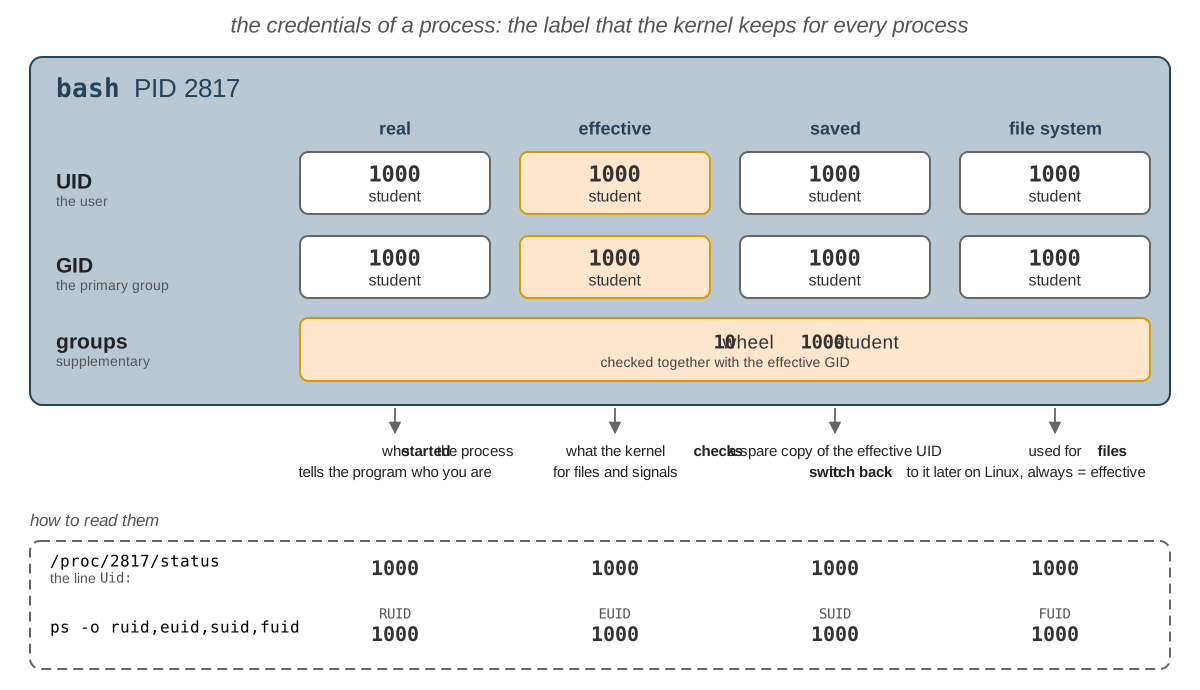
| Credential | What it is |
|---|---|
| real UID and GID | the user who started the process, and their primary group; programs read them to find out who you are |
| effective UID and GID | the ones that the kernel checks, when the process opens a file; ps shows the effective user in the column USER |
| saved UID and GID | a spare copy of the effective ones, made when the program starts, so that it can put its rights aside for a while and take them back |
| file system UID and GID | used only for files; on Linux, they always follow the effective ones, so you can ignore them |
| supplementary groups | the other groups of the process, checked together with the effective GID; copied from the groups database at login, and by su and sudo |
For your shell, all the UIDs and GIDs are 1000. They differ in two cases: a setuid program changes the effective and
the saved UID, but not the real one; login, su and sudo change all of them for the program they start.
Which Credentials Are Checked
What the kernel checks depends on what the process asks for:
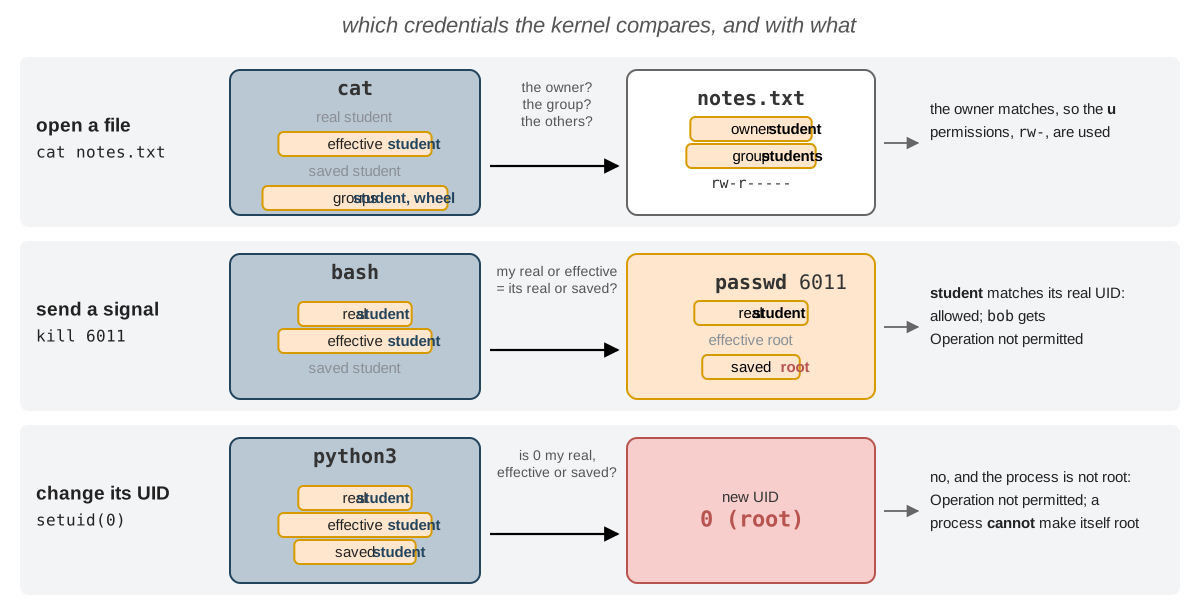
- opening a file: the effective UID is compared with the owner of the file, and the effective GID and the supplementary groups with the group of the file (see Which Permissions Apply?);
- sending a signal, with
kill: the real or the effective UID of the sender must be the real or the saved UID of the target. You can end apasswdthat you started, even if it runs asroot, because its real UID is yours;bobcannot; - changing its own UIDs: a process that is not
rootmay only take a UID that it already has, its real, its effective or its saved one. A process cannot make itselfroot. Only a process whose effective UID is0may take any UID.
How the Credentials Change
What happens to the UIDs at each step of the life of a process:
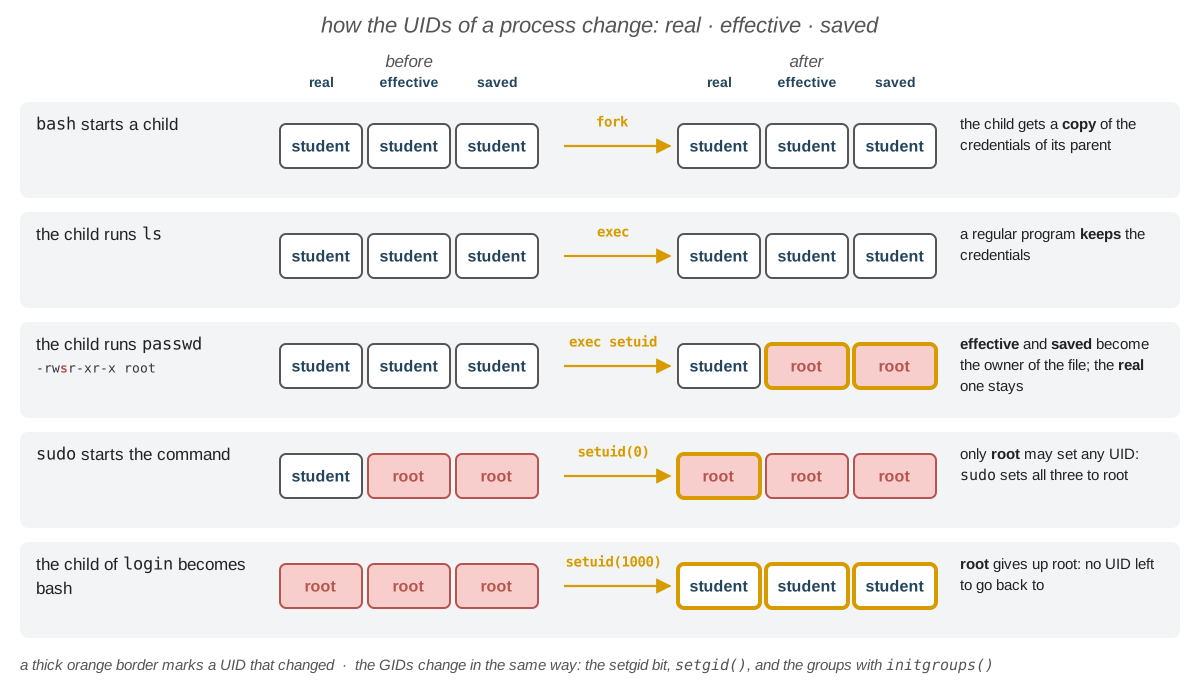
| When | What happens to the UIDs |
|---|---|
fork, a new child | the child gets a copy of the credentials of its parent |
exec of a regular program | nothing changes |
exec of a program with the setuid bit | the effective and the saved UID become the owner of the file; the real UID does not change; the setgid bit does the same for the GIDs, with the group of the file |
a process whose effective UID is 0 calls setgid(), initgroups() and setuid() | all the GIDs, the supplementary groups and all the UIDs change, in this order: this is how login, su and sudo give a process the label of a user (see Logging In and sudo) |
Seeing the Credentials
There are two ways to see the credentials of a process:
[student@fedora ~]$ ps -o pid,ruser,euser,suser,comm -p $$
    PID RUSER    EUSER    SUSER    COMMAND
   2817 student  student  student  bash
[student@fedora ~]$ grep -E '^(Uid|Gid|Groups):' /proc/$$/status
Uid:	1000	1000	1000	1000
Gid:	1000	1000	1000	1000
Groups:	10 1000
ps -otook the names of the columns:ruseris the real user,euserthe effective one andsuserthe saved one.man pslists all of them, for the UIDs, the GIDs and the groups, in the sectionSTANDARD FORMAT SPECIFIERS.- The
Uid:andGid:lines of/proc/<PID>/statushave 4 numbers: real, effective, saved and file system;Groups:has the supplementary groups (man 5 proc). Everybody can read thestatusfile of any process.
A process cannot make itself root. python3 can read its UIDs with os.getresuid() and try to change them with
os.setuid():
[student@fedora ~]$ python3 -c 'import os; print(os.getresuid()); os.setuid(0)'
(1000, 1000, 1000)
Traceback (most recent call last):
  File "<string>", line 1, in <module>
    import os; print(os.getresuid()); os.setuid(0)
                                      ~~~~~~~~~^^^
PermissionError: [Errno 1] Operation not permitted
The kernel refused: 0 is none of the UIDs of the process. To get root, a process must start a setuid program of
root (sudo, su, passwd) or be started by a process that already runs as root (login).
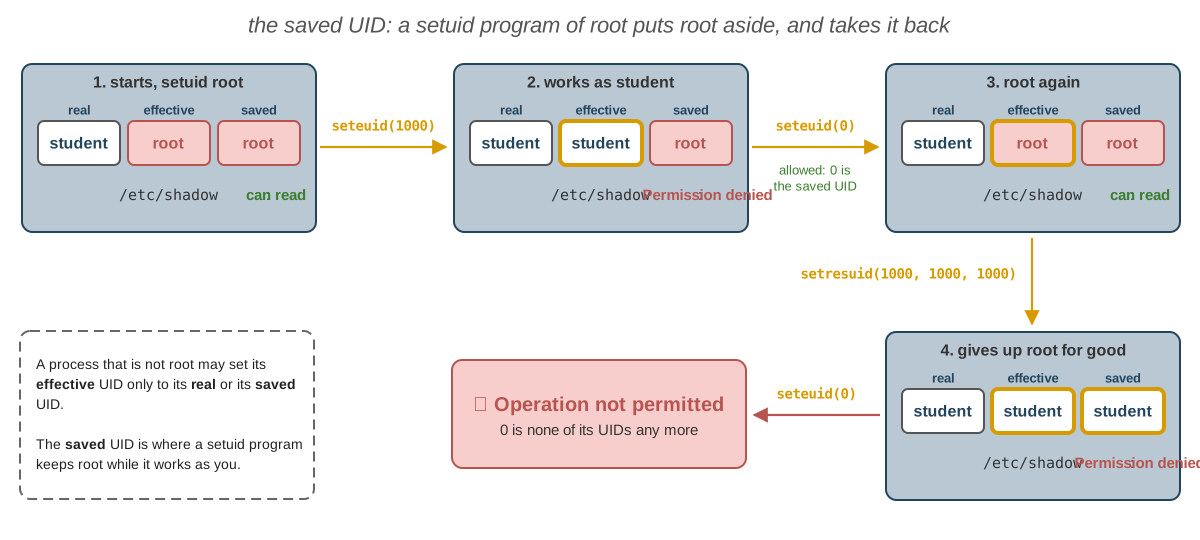
The Saved UID
A careful setuid program works as you, and uses root only for the steps that need it, so that a bug elsewhere can
do only what you could do. The saved UID makes this possible. After the exec, its Uid: line is 1000 0 0 0:
- the program sets its effective UID to its real one,
1000(Uid: 1000 1000 0 1000):rootstays only in the saved UID; - when it needs
rootagain, it sets its effective UID back to0(Uid: 1000 0 0 0): this is allowed, because0is its saved UID; - when it does not need
rootany more, it sets all three UIDs to1000(Uid: 1000 1000 1000 1000):0is none of its UIDs now, so it can never go back.
Troubleshooting
| Problem | Solution |
|---|---|
A user that ps or ls shows is not in /etc/passwd | It is not a local user: always look up users with getent passwd, and groups with getent group |
Permission denied on a file | ls -l the file and id: find which set applies to you (owner, group or others) and what it allows |
Permission denied on a file that has r for you | One of the directories of its path has no x for you: ls -ld each of them |
./script.sh: Permission denied | The file has no x: chmod u+x script.sh |
Operation not permitted for chmod or chown | Only the owner may run chmod, and only root may change the owner: use sudo |
student is not in the sudoers file. | The user is not an administrator: not in wheel (Fedora) or sudo (Ubuntu); an administrator must run sudo usermod -aG wheel student, then log in again |
sudo echo ... > file: Permission denied | The redirect is done by your shell, before sudo: use echo ... | sudo tee file |
su: Authentication failure for su - | root has no password on Fedora and Ubuntu: use sudo -i |
A new group does not show up in id | The groups are read at login: log in again, or start a new login shell with su - <USER> |
usermod -G removed my groups | You forgot -a; add them back with sudo usermod -aG <GROUP> <USER> |
passwd: BAD PASSWORD: The password is shorter than 8 characters | Choose a longer, less simple password; as root, you may set it anyway |
useradd: user 'bob' already exists | The user is already there: check with id bob |
userdel: user bob is currently used by process 1234 | bob still has processes: end them, or log bob out first |
rm: remove write-protected regular file? | You do not have w on the file, but you have it on the directory: answer y to delete it anyway |
rm: cannot remove ... Operation not permitted in /tmp | The sticky bit: only the owner of the file can delete it |
A file shows a number instead of an owner in ls -l | The user was deleted, but the file still has its UID |
Exercises
- 🧪 First Steps (exercises 1 - 14): one idea at a time, in the order of the lab, to do in the lab;
- 🏠 Going Further (exercises 15 - 32): longer exercises, to do at home; many of them look at the label of a process, explained in The Credentials of a Process;
- 📝 Challenges (exercises 33 - 39): the hardest ones, like the ones at the exam.
Use sudo only where the exercise asks for it, and never on the directories of the system. Never remove yourself
(student) from the group of the administrators, wheel on Fedora and sudo on Ubuntu, or you lose sudo.
🧪 First Steps
Do these exercises in order, during the lab. Each one starts with what it wants you to achieve, and tries one idea
from the lab: read the section linked at the end of the exercise if you get stuck. Run the commands in ~/lab05,
unless the exercise says otherwise.
Users and groups
-
The practice tree: Create the files and directories that the other exercises use, in
~/lab05.-
run these commands (copy them from the browser with Ctrl+C and paste them in the terminal with Ctrl+Shift+V):
mkdir -p ~/lab05/noread ~/lab05/noentercd ~/lab05printf 'buy milk\n' > notes.txtprintf 'top secret\n' > noread/secret.txtprintf 'top secret\n' > noenter/secret.txtprintf '#!/bin/bash\nid -un\n' > myid.sh -
show the tree of
~/lab05.
Check:
~/lab05has the directoriesnoreadandnoenter, each with asecret.txt, and the filesmyid.shandnotes.txt. → Navigation -
-
Who am I: Find out your user name, your UID and your groups, and which user runs the commands you start.
- print your user name, with two different commands;
- print your UID, your primary group and all your groups with one command; then only your UID, then only the names of your groups;
- print what the system knows about the user
root, without becomingroot; - list the processes of your terminal, with the user that runs each of them.
💡
man id: search forname,userandgroups;man ps: search for-oand foruser.Check: the name is
studentand the UID1000; your primary group isstudent(1000), and your groups arestudentandwheel(Ubuntu:sudo, and a few more);roothas the UID0and only the grouproot.bashandpsrun asstudent:pswas started from your shell, and it runs as the same user. → Who Am I · Groups · The User of a Process
The users and groups databases
-
Your account in the databases: Find your own account in the users and the groups databases, and read every field of it.
- print the permissions of
/etc/passwdand of/etc/group; - print your line from the users database, and say what each of its 7 fields is;
- print the lines of the groups
wheel(Ubuntu:sudo) andstudentfrom the groups database; then print the groups of the userstudentwithid; - find the user with the UID
0and the group with the GID10(Ubuntu:27), by their numbers; - print the users whose shell is not
nologin.
💡
man getent: theDATABASESarepasswd,group,shadow, ...;man 5 passwdandman 5 groupexplain the fields;man grep: search forinvert.Check: both files are
-rw-r--r-- root root. Your line isstudent:x:1000:1000:Student:/home/student:/bin/bash: name, password (x: it is elsewhere), UID, GID of the primary group, full name, home directory and shell.wheeliswheel:x:10:student, butstudentisstudent:x:1000:: the members of a primary group are not listed. The UID0isroot, the GID10iswheel(Ubuntu:27,sudo). Besidesrootandstudent, only a few system users have another program thannologin:sync(/bin/sync), and on Fedora alsoshutdownandhalt(on Ubuntu, some have/bin/false); none of them gives a shell. →/etc/passwd·/etc/group·getent - print the permissions of
Becoming root
-
sudo: Run commands asroot, see howsudoremembers that you typed your password, write into a file ofroot, and start a shell ofroot.- print your user as
root; do it again, and see that the password is not asked; 2. makesudoforget that you typed your password, and print your user asrootagain; - try to print the first line of
/etc/shadowas yourself; then run the same command again asroot, without typing it again; - create the directory
/srv/lab05and the empty file/srv/lab05/root.txt, asroot; try to add the linehelloat the end of the file withsudo echoand>>; then do it with a command that writes to a file and to the screen, and print the file; - start a login shell of
root, print the user and the current directory, and leave it.
💡
man sudo: search forinvalidateandlogin;man bash: search forHISTORY EXPANSIONand then for!!;man tee: search forappend.Check: the user is
root; aftersudo -k,sudoasks for the password again. As yourself,/etc/shadowgivesPermission denied;!!prints the command it became, runs it, and shows the line ofroot.sudo echowith>>fails withPermission denied: your shell opens the file, notsudo; at the end, the file hashello. The shell ofrootstarts in/root, with#in the prompt. →sudo· The Redirect Trap - print your user as
Managing users and groups
-
Two new users and a group: Create
bobandcarol, who play a member of your group and a stranger in the rest of the lab, and the groupstudents, withbobas its only member.- check that
bobandcaroldo not exist yet; - create the user
bob, with a home directory, the shell/bin/bashand the full nameBob Jones, and the usercarol, the same way, with the full nameCarol White; - set the password of both of them to
uso2026; - create the group
students, and addbobto it, without removing his other groups; - print the groups of
bobandcarol, the line ofstudentsfrom the groups database, and the owners of the directories in/home.
💡
man useradd: search forhome,shellandcomment(the full name);man -k groupfinds the command that creates a group;man usermod: search for-Gand then forappend.Check: before,
idsaysno such user; after,bobandcarolhave the UIDs1001and1002and a group of their own each, and they own/home/boband/home/carol;studentsisstudents:x:1003:bob. Setting the password may warnBAD PASSWORD: The password is shorter than 8 characters, butrootmay set it anyway. → Managing Users and Groups - check that
-
A temporary user: Create the account
dave, change it, put it in a group and take it out, and delete it without leaving anything behind.- create
dave, with a home directory, the shell/bin/bashand the full nameDave Brown, without a password; print his line from the users database and from/etc/shadow(withgetent, asroot); - change his full name to
David Brown, and print his line again; - add him to
studentswithgpasswd, print his groups; then remove him fromstudents, and print them again; - delete
davetogether with his home directory, and check that the user, his group and/home/daveare gone.
💡
man usermod: search forcomment;man gpasswd: search foraddand fordelete;man userdel: search forhome.Check: the password field of
daveis!!(Ubuntu:!): nobody can log in as him yet. After step 2, only the 5th field changed. His groups aredave students, then onlydave. At the end,id daveprintsno such user,getent group daveprints nothing, andls -d /home/davesaysNo such file or directory. → Managing Users and Groups ·/etc/shadow - create
Logging in
-
Become another user: Log in as
bobon a text terminal, and becomecarolwithsu.- switch to the third virtual terminal and log in as
bob; print the user, the current directory and the groups; try to print your user asrootwithsudo; log out, and go back to Sway (at home, to your graphical desktop); - in a terminal, become
carolwith a login shell; print the user and the current directory; leave withexit, and print the user again.
💡 Ctrl+Alt+F3 (Host+F3 in VirtualBox), and back with Ctrl+Alt+F1 or F2;
man su: search forlogin.Check: the shell of
bobruns in/home/bob, with the groupsbobandstudents;sudorefuses him:bob is not in the sudoers file..suasks for the password ofcarol, not yours; her shell starts in/home/carol; afterexityou arestudentagain. → Logging In ·su· Virtual Terminals - switch to the third virtual terminal and log in as
File permissions
-
Read the permissions: Learn to read who owns a file and what each user may do with it, and predict the permissions of a new file.
- print the permissions, the owner and the group of
notes.txt,/etc/passwd,/etc/shadowand of the directory~itself (not its content); - print the same with
stat, as letters and as numbers, with the owner, the group and the name; - print your
umask; guess the permissions of a new file and of a new directory, then createnew.txtandnewdirand check; - set the
umaskto077, createprivate.txt, and print its permissions; then set theumaskback to the value of step 3, because the next exercises need it.
💡
man ls: search fordirectories themselves;man stat: search for%a,%A,%U,%Gand--format.Check:
notes.txtis-rw-r--r-- student student(644; Ubuntu:-rw-rw-r--,664);/etc/passwdis-rw-r--r-- root root(644);/etc/shadowis---------- root root(0; Ubuntu:-rw-r----- root shadow,640);~isdrwx------(700) on Fedora,drwxr-x---(750) on Ubuntu. With theumask0022,new.txtisrw-r--r--andnewdirisrwxr-xr-x(Ubuntu,0002:rw-rw-r--andrwxrwxr-x); with077,private.txtisrw-------. → Owner, Group and Permissions ·umask - print the permissions, the owner and the group of
-
chmod: Change the permissions one at a time, with letters, or all at once, with a number, and see that a program needsxto run.- on
notes.txt, removerfor the group and the others; - remove
wfor yourself, and try to add a line to it; addwback, and add the line; - set the permissions of
notes.txtback torw-r--r--with one command, with letters; - run
./myid.sh; give itrwxr-xr-x, with a number, and run it again.
Check: after step 1,
notes.txtis-rw-------; in step 2 you getPermission denied, even if it is your file; after step 3 it is-rw-r--r--again. Withoutx,./myid.shgivesPermission denied; with755, it printsstudent. →chmod - on
-
r,wandxfor directories: See what each permission allows on a directory, and who may delete a file.- give
noreadonlyxfor you (--x------) andnoenteronlyr(r--------); - try to list them, to enter them, and to print the
secret.txtinside them; then give both backrwxr-xr-x; - copy
notes.txttoro.txt, and make it read only for everybody; try to add a line to it, then delete it.
Check:
noreadcannot be listed, butnoread/secret.txtcan be printed;noenterlists the name (with an error), but cannot be entered, and its file cannot be printed. You cannot writero.txt, butrmasksremove write-protected regular file 'ro.txt'?, and afterythe file is gone: deleting a file changes the directory, and you havewon~/lab05. →r,wandx - give
-
A shared directory: Share files with the group
studentsin/srv/lab05, and see which set of permissions applies to the owner, to a member of the group and to the others.- make yourself the owner of
/srv/lab05andstudentsits group, with one command; - create in it, as yourself,
plan.txtwith the textthe planandreport.txtwith the textthe report; - give
report.txtthe groupstudentsand the permissionsrw-r-----; list the directory itself, then its content; - print both files as
boband ascarol; try to add a line toreport.txtasbob.

💡
man chown: search forOWNER:GROUP. You are not a member ofstudents, so giving a file this group needsroottoo.man sudo: search for-u user; to write asbob, use the trick from The Redirect Trap.Check:
/srv/lab05isdrwxr-xr-x student students;report.txtis-rw-r----- student studentsandplan.txtis-rw-r--r--(Ubuntu:-rw-rw-r--) with your own group.bobreads both files: forreport.txthe gets thegset,r--, so he cannot write it (Permission denied).carolreadsplan.txt, but notreport.txt: she is one of the others, who have nothing. → Which Permissions Apply? ·chownandchgrp - make yourself the owner of
Special permissions
-
The special bits: See the special bits of the system, a directory where nobody can delete the files of the others, and a directory that gives its group to every new file.
- print the permissions of
/usr/bin/passwdand of/tmp, as letters and as numbers; - create
/tmp/student.txt, give everybodywon it, and try to delete it asbob; - create the directory
/srv/lab05/team, give it the groupstudentsand the permissionsrwxrwsr-x; createteam/bob.txtasbob, and list it.
💡 Special Permissions has the numbers of the bits. You are not a member of
students, so change the group and the permissions ofteamasroot(seesetgidon a Directory).Check:
/usr/bin/passwdis-rwsr-xr-x(4755): thesmakes it run asroot, whoever starts it;/tmpisdrwxrwxrwt(1777).bobcannot delete/tmp/student.txt(Operation not permitted), although he haswon/tmp, and even on the file: thetof/tmp.teamisdrwxrwsr-x student students, andbob.txtis-rw-r--r-- bob students: it got the group of the directory. →setuid·setgidon a Directory · The Sticky Bit - print the permissions of
The prompt
-
The prompt: Change what the prompt of
bashshows, and see that it is only text, which the kernel does not look at.- print the value of
PS1; change the prompt tostudent in ~/lab05 $, with the user, the whole path and the$of the user; - change the prompt so that it looks like the prompt of
root; print your user and try to print/etc/shadow; - go back to the original prompt.
💡
man bash: search forPROMPTING.Check: the original is
[\u@\h \W]\$on Fedora; on Ubuntu it is longer, with the colors, but it shows\u@\h:\w\$. With the fake prompt ofroot, the user is stillstudent, and/etc/shadowis still denied:whoamiasks the kernel, and the prompt is only text. → The Prompt · Changing the Prompt - print the value of
Changing a password
-
bobchanges his password: See what changes in/etc/shadowwhen a user changes his own password, and how he can do it although he cannot read the file.- print the line of
bobfrom/etc/shadow, asroot; - become
bobwith a login shell, and try to print his line from/etc/shadow; - still as
bob, change his password tobob123; ifpasswdrefuses it and ends, run it again withLab05-k7Qx-2026; leave the shell ofbob; - print his line again, as
root, and compare the salt and the hash with the ones of step 1; - set the password of
bobback touso2026, asroot: the exercises at home need it.
💡 Changing a Password; look at the permissions of
/usr/bin/passwd.Check: as
bob,getent shadow bobprints nothing.passwdasks for his current password,uso2026, and refusesbob123, saying why (on Fedora,BAD PASSWORD: ...). After the change, the salt and the hash are different.bobchanged a file he cannot read because/usr/bin/passwdhas thesof the owner: it runs asroot. → Changing a Password · Hashes and Salt ·setuid - print the line of
🏠 Going Further
Each exercise starts with its goal; you choose the commands. At the end, check the goal itself, not only that each
command worked. The exercises use bob, carol, students and /srv/lab05 from the First Steps.
The label of a process
-
The credentials of your shell and of
passwd: See all the credentials that the kernel keeps for your shell, and find out which of them thesetuidbit ofpasswdchanges.- print the PID of your shell; print its real, effective and saved user, and its supplementary groups, with
one
pscommand; - print the
Uid:,Gid:andGroups:lines of itsstatusfile in/proc, and find out in the manual what each of the 4 numbers ofUid:is; - in the second terminal, start
passwd, and do not type anything; in the first terminal, print the same columns and the same lines forpasswd; - end
passwdwith Ctrl+C.

💡
$$is the PID of the shell (lab 04);man ps, sectionSTANDARD FORMAT SPECIFIERS: search forreal user,effective user,saved userandsupplementary;man ps: search forcommand name;man 5 proc: search forUid.Check: for your shell, the three users are
student,Uid:is 4 times1000(real, effective, saved and file system UID), andGroups:has10and1000, the GIDs ofwheelandstudent(Ubuntu:27forsudo, and a few more). Forpasswd, the real user isstudentand the effective and saved users areroot:Uid:is1000 0 0 0. Thesof/usr/bin/passwdchanged the effective and the saved UID, but not the real one:passwdstill knows who started it. → The Credentials of a Process ·setuid - print the PID of your shell; print its real, effective and saved user, and its supplementary groups, with
one
-
Who may end a process: Find out how
sudochanges the credentials of the command it starts, and who may then end the command withkill.For steps 3 - 6, first write down your guess, then check it:
- in the second terminal, print the PID of the shell, then run
sleep 300asroot; in the first terminal, show the tree of processes of the second shell, with the PIDs, and list these processes with their PID, PPID, terminal, real and effective user; - print the
Uid:line of the firstsudo(the one whose parent is the second shell) and ofsleep; which one has the same line aspasswdin exercise 15, and why? - can you end
sleepwithkilland its PID? - send the signal to the first
sudoinstead; what happens tosleep? - in the second terminal, run
sleep 300asbob; print itsUid:andGroups:lines; can you end it? Canbobend it (runkillasbob, withsudo)? - in the second terminal, start
passwd; can you end it from the first terminal? Canbob?
💡
man pstree: search forpid;ps -ptakes several PIDs, separated by,;man pgrepfinds the PID of a process from its name.sudoruns its command on a new pseudo terminal (seesudo), sops -twith the terminal of the second shell does not findsleep. Forkill, use the rule from Which Credentials Are Checked.Check: the tree is
bash───sudo───sudo───sleep. The firstsudois1000 0 0 0, likepasswd: it is a setuid program;sleepis0 0 0 0:sudo, asroot, set all the UIDs of its child. So you cannot endsleep(Operation not permitted), but you can end the firstsudo, whose real UID is yours, andsudopasses the signal on tosleep. Thesleepofbobhas 4 times the UID ofboband the GIDs ofbobandstudents:bobcan end it, you cannot. You can end yourpasswd;bobcannot. → Which Credentials Are Checked ·sudo - in the second terminal, print the PID of the shell, then run
-
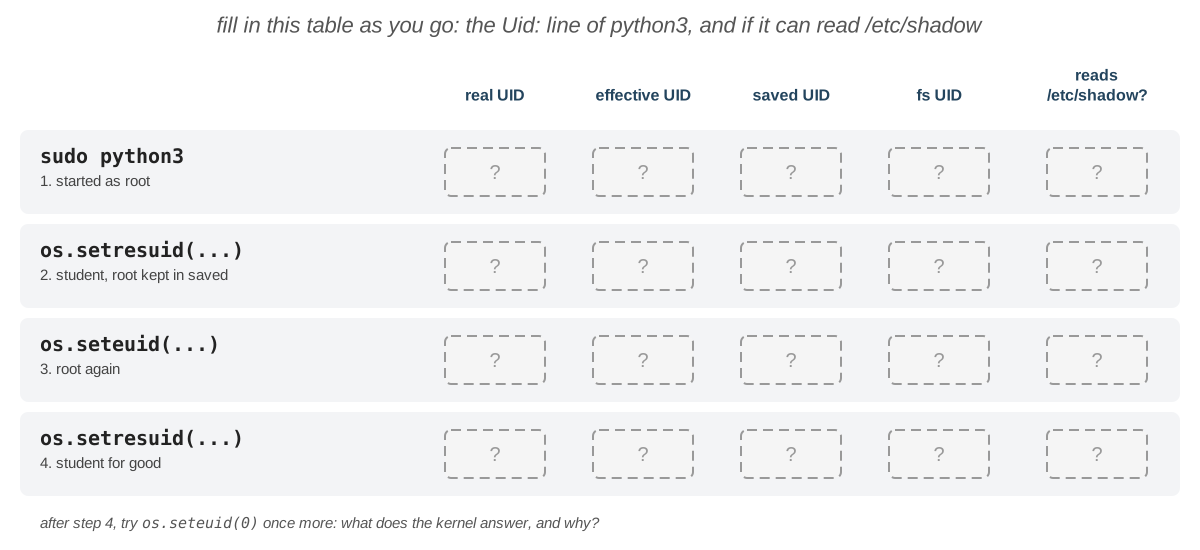
Play a setuid program: See how the saved UID lets a setuid program put
rootaside and take it back, by acting as one, as in The Saved UID.After each step, print the
Uid:line of thepython3process from the second terminal, and try to read the first line of/etc/shadowfrompython3:- in the first terminal, start
python3asroot; print its real, effective and saved UID; - become
studentin the real and the effective UID, but keeprootin the saved UID; - take
rootback, in the effective UID only; - set all three UIDs to
1000, and try to takerootback once more.
💡 In
python3,import osfirst, thenhelp(os.getresuid),help(os.setresuid)andhelp(os.seteuid);open('/etc/shadow').readline()reads the first line of a file;exit()leavespython3.Check:
Uid:is0 0 0 0, then1000 1000 0 1000and/etc/shadowis denied, then1000 0 0 0and it can be read again, because0was the saved UID; after the last step,Uid:is1000 1000 1000 1000andseteuid(0)fails withOperation not permitted. The 4th number, the file system UID, always follows the 2nd. → The Saved UID · Which Credentials Are Checked - in the first terminal, start
-
A new colleague, from the first day to the last:
erinjoins the team, becomes an administrator, and leaves after a while. Manage her account from the first day to the last, and find out why her old shell does not get the new rights.Check every step before you go to the next one:
- create her account, with two commands: a home directory, the shell
/bin/bash, the full nameErin Gray, the supplementary groupstudents, and a password; - log in as
erinon the third virtual terminal; check that she starts in/home/erin, is instudents, and thatsudorefuses her; - she becomes an administrator: while she is still logged in on
tty3, make her one. In the same shell oferin, printid erin, thenid, then theGroups:line of/proc/$$/status, and trysudoagain; then log out, log in again, and try once more; - she changes her name: make her full name
Erin Black; - she leaves: log her out, and delete her account, her group and her home directory.
💡
man useradd: search forshell,commentandgroups;man usermod;man userdel; the group of the administrators is in the table ofsudo.Check: after step 1,
id erinshowsstudents, and her line hasErin Grayand/bin/bash. At step 3,id erinshowswheel(Ubuntu:sudo), because it reads the database, butidandGroups:do not (no10; Ubuntu:27): the label of the old shell was set at login, sosudostill refuses her. After a new login,sudoworks, with her password. Step 4 changes only the 5th field. At the end,id erin,getent group erinandls -d /home/erinfind nothing. → Logging In · Managing Users and Groups - create her account, with two commands: a home directory, the shell
Users and passwords
-
Your password entry: Read your own line from
/etc/shadow, find the parts of its hash, and find out when you last changed your password.- print the permissions of
/etc/shadow, then try to print your line from it withgetent, as yourself and asroot; - find the algorithm and the salt of your hash;
- print the password dates of your account; turn the 3rd field of your line into a date.
💡
man 5 shadowexplains the fields;man 5 crypt: search foryescrypt;man chage: search forlist;man date: search for--date(the date can be1970-01-01 + N days).Check:
/etc/shadowis----------(Ubuntu:-rw-r----- root shadow); as yourself,getent shadowprints nothing; asroot, it prints a line whose hash starts with$y$, yescrypt; the salt is the part between the 3rd and the 4th$. The two dates of step 3 are the same day. →/etc/shadow· Hashes and Salt - print the permissions of
-
Audit the users database: An attacker who becomes
rootoften adds a second user with the UID0: a hiddenroot, with an innocent name. Check that your system has no such user, and find out which users can log in with a shell.- find all the users whose UID is
0; - find the users whose shell is
/bin/bash; - find the users whose home directory is in
/home, and count them.
💡 Read the users with
getent passwd; the UID is the 3rd field, the home directory the 6th and the shell the 7th. Filter the lines withgrep(lab 03):[^:]*:matches one field and its:, and^the start of the line. Print only the names withcut(man cut: search fordelimiterand forfields). Why isgrep 0not enough? Why isgrep ':0:'not enough either?Check: only
roothas the UID0.grep 0also finds every line with a0anywhere, like the UID1000;grep ':0:'also finds the users whose GID is0./bin/bashis the shell ofroot,student,bobandcarol; the users in/homearestudent,bobandcarol:3. →/etc/passwd·getent - find all the users whose UID is
-
Accounts on hold:
bobandcarolhave the same password.bobgoes on holiday, and the internship ofcarolended on 1 January 2020. Find out whether/etc/shadowshows that they have the same password, then stop both accounts without deleting anything and without changing their passwords, and let them back in: they must log in with their old passwords.- print the lines of
bobandcarolfrom/etc/shadow, and compare their salts and their hashes; - lock the password of
bob, and print his line; try to becomebobwithsu, with the right password; unlock it, and try again; - make the account of
carolexpire on 1 January 2020, and print her password dates and her line; try to becomecarol; then remove the expiry date.
💡
man passwd: search forlock;man chage: search forexpiredate, and for-1.Check: the salts are different, so the hashes are different too: nobody can tell from
/etc/shadowthat the passwords are the same. The hash ofbobgets!!in front (Ubuntu:!) andsufails withAuthentication failure; after the unlock, the!disappear andsuworks. The 8th field ofcarolbecomes18262, the day 1 January 2020, andsurefuses her with a message that the account has expired; at the end the field is empty again. →/etc/shadow· Hashes and Salt · Changing a Password - print the lines of
-
Is it the permissions?: Learn to tell, from the error, when
sudohelps and when it does not.Run each command without
sudo, decide if the error is about permissions (thensudofixes it) or something else (thensudodoes not help), and check withsudo:cat /var/log/kill/them/all.log;userdel hariseldon;chown $USER /home/search/and/destroy;cat /root/missing.txt;dnf install sports-illustrated(on Ubuntu,apt install sports-illustrated).
Check: when the error was about permissions (2, 4 and 5),
sudomakes it go away, and the command then fails with the real error: the user, the file or the package does not exist. When the error was about something else (1 and 3,No such file or directory),sudogives the same error. →sudo·r,wandx
Permissions
-
xon every directory:bobneeds to read yournotes.txt. Find the smallest change that lets him, without letting him see the names of your other files.- as
bob, printnotes.txtfrom your~/lab05, with its absolute path; - find out why it fails, by looking at the permissions of every directory of the path;
- give the others only
xon your home directory, and try again; then try to list your home directory asbob; - take the
xback.
Check:
/home/studentisdrwx------(Ubuntu:drwxr-x---), andbobis one of the others, so he cannot pass through it; withxfor the others,bobreadsnotes.txt(it isrw-r--r--), but cannot list your home directory: he has noron it. →r,wandx - as
-
The owner is checked first: Show that the kernel uses only one set of permissions, even when another set would allow more.
- copy
notes.txtto/srv/lab05/first.txt, and give it the groupstudents(you are not a member: useroot); - give it
----rw-r--; - try to read it yourself, as
boband ascarol; then try to add a line to it asbob.
Check: you, the owner, cannot read it (
Permission denied);bobcan read it and write it (thegset), andcarolcan read it (theoset). → Which Permissions Apply? - copy
-
Octal by hand: Learn to switch between the letters and the numbers of the permissions without help.
Without the computer:
- write as numbers:
rwxr-x---,rw-rw-r--,r--------,rwx--x--x,rw-r--r--; - write as letters:
751,664,400,700,555; - check your answers on a file
test.txt.
Check: set each value on
test.txtin the form you started from, and print the other form withstat: it must be the one you wrote. →chmod - write as numbers:
-
A private
umask: Make every new file of your shell private, and find out for which processes, and for how long, this lasts.In a new terminal:
- set the
umaskso that the new files and directories are private, then createprivate2.txtandprivdir; - print the
umaskof a childbash; - print the
Umask:line of thestatusfile of your shell; - close the terminal, open a new one, and print the
umask.
💡
man 5 proc: search forUmask.Check:
private2.txtisrw-------andprivdirisrwx------; the child prints0077, like its parent, and theUmask:line is0077: the kernel keeps aumaskfor every process, and a child inherits it, like the label; the new terminal has the oldumaskagain. →umask - set the
Permission puzzles: In each exercise, set the permissions (and the group, if you need it) so that exactly the
given users can do the given things, and nothing more. You are not a member of students, so giving a file this group
needs root. Then test every user (student, bob and carol) by reading, listing, writing or running the files.
-
A public directory: Publish files that everybody may read, but only you may change.
/srv/lab05/public, with two files,a.txtandb.txt:- everybody can list the directory and read the files;
- only
studentcan create, delete or change files in it; - use one
chmodwith letters for the directory and all the files.

Start by closing
publicand everything inside it to the group and the others, with one command, and check thatcarolcannot reada.txt; then open it as asked.💡
man chmod: search forrecursive, and for the capitalX.Check: while it is closed,
publicisdrwx------anda.txtis-rw-------; at the end,carollistspublicand readsa.txt, but cannot createpublic/c.txtor changea.txt; the files did not get anx. →chmod -
A script for the group: Let the group run a script, without letting it change the script.
/srv/lab05/tool.sh, a copy ofmyid.sh:- the members of
studentscan run it, but not change it; - nobody else can read or run it.

First try to give the group only
xand run it asbob; then find the right permissions.Check: with only
xfor the group,bobgetsPermission denied: think about whatbashmust do with the file to run the commands inside it. With the right permissions,bobruns it and it printsbob;carolcan neither read it nor run it. →r,wandx - the members of
-
Known names only: Hide a file in a directory, so that only those who know its name can read it.
/srv/lab05/hidden, with the filekey.txt:- the members of
studentscan readkey.txtif they know its name, but cannot list the directory; - nobody else can do anything.

Check:
bobcan printhidden/key.txt, butls hiddenis denied;carolcannot reachkey.txt, even with its name. →r,wandx - the members of
-
A private list: Help
bobshare a file from his home directory with his group, and with nobody else.As
bob:
- close
/home/bobto everybody exceptbob(it is already like this on Fedora, not on Ubuntu); create/home/bob/todo.txtwith the textBob's TODO list, readable and writable only bybob; check thatcarolcannot read it; - change it so that the members of the group
bobcan also read it, and nobody else can do anything; - leave, add yourself (
student) to the groupbob, and try to read the file from a new login shell; - find out why it still fails, and let
bobchange the right directory so that it works, without lettingcarolin; - remove yourself from the group
bob.
Check: at step 3 it is still denied, although you are in the group
boband the file gives its groupr: look at every directory of the path. After the fix you can read the file, but you cannot list/home/bob, andcarolstill gets nothing. → Which Permissions Apply? ·r,wandx - close
The prompt
-
A prompt that tells the truth, and stays: Unlike the fake
rootof the First Steps, make a prompt that shows the UID of the shell, so that it changes by itself, and keep it for every new terminal.- make a prompt that shows your UID, from a variable of
bash, and the$or#; - start a login shell of
root, set the samePS1in it, and look at the prompt; leave it; - add your
PS1at the end of~/.bashrc, open a new terminal, and check the prompt; - start a login shell of
root, and look at its prompt.
💡
man bash: search forEUID; writePS1between single quotes, so that the variable is replaced every time the prompt is shown, not once when you set it.Check: your prompt shows
1000and$; the shell ofrootshows0and#:\$and$EUIDcome from the label of the shell, not from a text you typed. The new terminal has your prompt; the shell ofrootdoes not: it reads/root/.bashrc, not yours. → Changing the Prompt - make a prompt that shows your UID, from a variable of
Clean up
-
Clean up: Leave the system as it was before the lab.
- delete the users
bobandcarol, with their home directories, and the groupstudents; - delete
/srv/lab05and/tmp/student.txt; - delete
~/lab05(if it fails, find out which directory has noworxfor you); - remove your
PS1from~/.bashrc.
Check:
id bob,id carolandgetent group studentsfind nothing;/srvdoes not havelab05. → Managing Users and Groups - delete the users
📝 Challenges
These exercises are like the ones at the exam. Each one gives you a result to reach and the rules you must follow, but not the steps: you decide the commands. Each one ends with the Check that will be used to grade it. Many of them need The Credentials of a Process.
All the challenges start from the same setup, the one you will find at the exam: the users bob, carol and dave,
the group students, with bob and dave as members, and the empty directory /srv/exam, owned by root. Copy and
run these commands once, before the first challenge (they do not change the users and the groups that exist already):
sudo groupadd -f students
for u in bob carol dave; do id "$u" &> /dev/null || sudo useradd -m -s /bin/bash "$u"; done
sudo usermod -aG students bob
sudo usermod -aG students dave
sudo mkdir -p /srv/exam
The users have no passwords: run commands as them with sudo -u <USER>. When you are done with all the challenges,
remove everything with:
sudo rm -rf /srv/exam
for u in bob carol dave grace; do id "$u" &> /dev/null && sudo userdel -r "$u"; done
sudo groupdel students
-
An offline attack: See how a hash depends on the password and on the salt, then find a password from its hash, the way an attacker with a copy of
/etc/shadowwould.-
hash the password
pass123with SHA-512 and the saltabc, twice; then with the saltxyz; then hashpass124with the saltabc; -
a user has this line in a stolen copy of
/etc/shadow:mallory:$6$uso2026$YT5ail.RilPFhAJ4Zo6bXZ6qayzFgl959rpxQZDutFYsI3F/Yq4zt5BFc04bFuFJN7PE9Scof6J8VZUPjp7Y20:20737:0:99999:7:::you know that the password is one of
123456,password,qwerty,dragonandletmein; find which one, with one command line; -
explain why
/etc/shadowmust not be readable by everybody.
💡
man openssl-passwd: search forSHA512and forsalt; one command can hash several passwords. Find the algorithm and the salt in the hash ofmallory;man grep: search forline-number.Check: in step 1, the first two hashes are the same; another salt, or one different letter, gives a completely different hash. In step 2, your command line prints exactly one hash, the one of
mallory, with its line number; the line number tells you the password. Anybody who can read a hash can try passwords on it, offline and unseen: this is why onlyrootmay read/etc/shadow. → Hashes and Salt -
-
Predict the credentials: Predict all the UIDs and GIDs of three processes, check them with a single command, and find every process that has the power of
rootand was started from a terminal.The three processes: your shell, a
sleep 300started asbobwithsudo, and apasswdwaiting for a password.- first fill in the table below on paper, from How the Credentials Change;
- start the two processes in other terminals; print, in one
pscommand, a column for each of: the real, effective, saved and file system UID, and the real and effective GID, for the three processes; compare; - find all the processes that run with the effective user
rootbut have a terminal, and show for each its terminal, its real and effective user, and its command.

💡
man ps,STANDARD FORMAT SPECIFIERS: search forsavedand forfilesystem;-ptakes several PIDs, separated by,; the processes without a terminal have?in theTTYcolumn.Check: the shell has
1000everywhere;sleephas the UID ofbobeverywhere, and the GID ofbob;passwdhas the real UID1000and the other three0, and the GIDs1000: it has only the setuid bit, not the setgid one. In step 3 you see theagettyof the virtual terminals that you opened, but where nobody is logged in, theloginof every one where somebody is, thesudo,suandpasswdthat are still running, and the shells ofroot; the real user tells you who started each of them. → The Credentials of a Process -
Who can do what: Predict which users may open which files, and who may end which process, then prove each answer with one command.
Create two files with these commands:
printf 'file a\n' | sudo tee /srv/exam/a.txt > /dev/nullprintf 'file b\n' | sudo tee /srv/exam/b.txt > /dev/nullsudo chown root:students /srv/exam/a.txtsudo chmod 640 /srv/exam/a.txtsudo chown bob:students /srv/exam/b.txtsudo chmod 064 /srv/exam/b.txtThen start these processes; run
passwdin a second terminal, and do not type anything:sudo -b -u bob sleep 601sudo -b sleep 602- first, on paper: for
student,bob,carolanddave, can they reada.txt? Readb.txt? Writeb.txt? - first, on paper: for
student,bobandcarol, can they endsleep 601?sleep 602?passwd? - prove every answer of the two tables with one command each, as the right user;
- end the three processes.
💡
man sudo: search forbackground;man pgrep: search forfull, to find a process by its whole command line;man 2 kill: search forIf sig is 0, to test if you may send a signal without sending one.Check: the files:
read a.txtread b.txtwrite b.txtstudentno yes no bobyes no no carolno yes no daveyes yes yes bobownsb.txt, so he gets theuset,---, even if his group may write it. The processes:studentmay end onlypasswd, whose real UID is his;bobmay end onlysleep 601, which runs with all his UIDs;carolmay end none; nobody butrootmay endsleep 602. Each answer must come from a command that prints the content or an error (Permission denied,Operation not permitted). → Which Permissions Apply? · Which Credentials Are Checked - first, on paper: for
-
A project for the group: Build a project directory for a group, where the files belong to the group and nobody can delete the work of the others.
Make
/srv/exam/projectso that:rootowns it, and only the members ofstudentscan enter it, list it and create files in it;- every new file in it belongs to the group
students, whoever creates it; - a member cannot delete or rename the files of another member.

Check:
stat -c '%A %U %G' /srv/exam/projectprintsdrwxrws--T root students: you needed two special bits. A file created byboband one created bydaveboth have the groupstudents, although their primary groups arebobanddave;bobgetsOperation not permittedwhen he deletes the file ofdave;carolgetsPermission deniedwhen she lists the directory. →setgidon a Directory · The Sticky Bit -
A homework box: Build a box where the students hand in their homework, without seeing the names of the files of the others or changing them, while the teacher may still clean it.
Make
/srv/exam/homeworkso that:student, the teacher, owns it and can do everything in it;- the members of
studentscan hand in files (create them), but cannot list the directory, so they cannot see the names of the others; - they cannot delete or replace the files of the others, even if they guess the names;
carolcan do nothing.

Hand in
bob.txtasbob, anddave.txtasdave; asbob, try to list the directory, to deletedave.txt, and to print it; then, as the teacher, deletedave.txt.Check:
stat -c '%A %U %G' /srv/exam/homeworkprintsdrwx-wx--T student students.bobcan create files, but cannot list the directory or deletedave.txt(Operation not permitted); he can printdave.txt, because he guessed its name: it isrw-r--r--, and he hasxon the directory. Hiding the names does not protect the content; only the permissions of the file do. The teacher can deletedave.txt: the owner of the directory may delete any file in it, even with the sticky bit;carolgetsPermission deniedfor everything. →r,wandx· The Sticky Bit -
Setuid programs and scripts: Find the programs of the system that run as their owner, and show why the setuid bit works for programs but not for scripts.
- list all the setuid files in
/usr, in the format ofls -l, without the errors, and count them; - as
root, copy/usr/bin/idto/srv/exam/rootid, and give it the setuid bit andrwxr-xr-x; run it as yourself and asbob; - as
root, create the script/srv/exam/rootid.sh, with the two lines#!/bin/bashandid, with the same permissions; run it as yourself; - create
/tmp/cap.txt, and give it the setuid bit withoutxfor the owner; create the directory/tmp/capdirwithrwxrwx---and the sticky bit, with one number; print the permissions of both, as letters and as numbers; - explain why
/usr/bin/sudois---s--x--xon Fedora, and what-rwsr-xr-xon Ubuntu allows in addition; - delete
rootid,rootid.sh,cap.txtandcapdir.
💡
man find: search for-permand for-ls.Check: there are a few tens of setuid programs at most, all owned by
root.rootidprintsuid=1000(student) gid=1000(student) euid=0(root) ...(anduid=ofbobforbob):idshowseuidwhen the effective UID is not the real one. The script prints onlyuid=1000(student) ..., withouteuid: the kernel ignores the setuid bit on scripts.cap.txtis-rwSr--r--(4644; Ubuntu:-rwSrw-r--,4664) andcapdirisdrwxrwx--T(1770): a capital letter means that the bit is set, but thexunder it is not. On Fedora, everybody may runsudo, asroot, but nobody may read the file; on Ubuntu, everybody may also read it, and so copy it. →setuid· Special Permissions - list all the setuid files in
-
The UID is what matters: Show that a file belongs to a UID, not to a name, and what happens when a UID is used again.
- find the UID of
carol, then delete her without her home directory; - list
/homewith names, then with numbers; - create the user
grace, without a home directory, with the UID thatcarolhad; - list
/homeagain, then deletegraceand/home/carol.
💡
man ls: search fornumeric;man useradd: search foruidand forno-create-home.Check: after
carolis deleted,/home/carolshows numbers instead of an owner and a group: the files keep only the UID and the GID. Whengracegets this UID,ls -lshows her as the owner of all the files ofcarol, and she may read and change them. Before a UID is used again, the files of the old user must be deleted or given to somebody else. → Users ·chownandchgrp - find the UID of
Wrap-up Questions
Use the last 5 minutes of the lab to answer these questions together with your colleagues and the teaching assistant. There are no wrong answers for the last two.
- What is a user for the kernel? And a group?
- Where are the local users, groups and passwords kept? Which command do you use to look up a user?
- Why can everyone read
/etc/passwd, but onlyrootcan read/etc/shadow? How doeslogincheck a password if the password is not stored anywhere? - Which one set of permissions does the kernel use for you, when you open a file? Why can the owner of a file
with
----rw----not read it? - What is the difference between
sudoandsu? Why doessudowork forstudent, but not for a new user? - Why does
sudo echo text > /etc/hostsfail? - What do
r,wandxmean for a directory? Why can you delete a file that you cannot write? - Why can you not trust the prompt to tell you who you are?
- What surprised you most about the permissions today?
- Which permissions will you give to your own files from now on?